
Introduction
If you are searching for reliable aplos nonprofit accounting reviews, the core question is whether the software can handle the strict stewardship of restricted resources while simultaneously nurturing donor relationships. In the rapidly advancing technological landscape of 2026, nonprofit financial management has transcended simple bookkeeping. The pressure to adhere to strict FASB (Financial Accounting Standards Board) compliance standards—specifically regarding the presentation of net assets and functional expenses—has never been higher. Today's tools have evolved from static ledgers to AI-driven ecosystems that automate reconciliation and predict cash flow.
Streamline your software evaluation process
This comprehensive aplos accounting review explores how the platform addresses these modern demands. Organizations relying on disjointed systems—spreadsheets for budgets, a generic commercial accounting tool for the ledger, and a separate CRM for donors—often drown in manual reconciliation and data silos. This operational fragmentation poses a significant risk. When financial data does not speak directly to donor data, the ability to generate accurate, audit-ready reports diminishes, and the risk of misappropriating restricted funds increases.
Enter Aplos, a platform purpose-built for the nonprofit sector. Unlike generic software like QuickBooks, which requires clumsy workarounds to handle fund accounting, Aplos promises a unified ecosystem where the general ledger and the donor database are inextricably linked. As we navigate this Aplos 2026 guide, we will dissect whether the platform delivers on its promises. We will analyze its technical capabilities in fund accounting, audit readiness, and donor management, while comparing it against leading alternatives like Raisely, Keela, Zeffy, and Care2.
Key Takeaways
Purpose-Built for Nonprofits: Aplos combines true fund accounting with a built-in donor management CRM, making it a highly effective all-in-one solution for churches and mid-sized nonprofits.
Seamless Financial Tracking: Unlike generic accounting tools, Aplos uses a dimensional chart of accounts to easily track restricted funds, grants, and specific programs without requiring messy workarounds.
Integrated Fundraising: The platform natively handles online donations, complex split gifts, and automated contribution statements, eliminating the need to constantly sync third-party fundraising apps.
Pricing Considerations: While Aplos offers robust features, its 2026 pricing model and potential implementation fees mean it is best suited for organizations managing over $500,000 in annual revenue. Smaller nonprofits might prefer zero-fee alternatives like Zeffy.
Pros and Cons of Aplos
No software is perfect. For a Financial Manager, understanding the limitations is just as important as knowing the capabilities.
Pros
True Fund Accounting Compliance: Unlike adapted commercial software, Aplos handles restricted funds natively, reducing audit risk and simplifying Form 990 prep.
All-in-One Ecosystem: The tight integration between the CRM and the GL significantly reduces manual data entry and reconciliation errors.
Audit Readiness: The 2026 enhancements to audit trails and read-only permissions make it a favorite among nonprofit CPAs.
Excellent Support: Aplos is known for its responsive customer support and extensive knowledge base, which is crucial for organizations with limited IT resources.
Cloud Mobility: Being 100% cloud-based allows for remote work, easy board reporting access, and automatic updates without IT maintenance.
Cons
Data Migration Complexity: Moving from a desktop-based system or a complex QuickBooks file can be challenging. Historical data often needs significant "cleaning" before import.
Cost for Micro-Orgs: For very small organizations with zero budget, the starting price point can be a barrier compared to free alternatives.
CRM Limitations: While the CRM is robust for general use, it lacks some of the advanced moves management and automation features found in standalone heavyweights like Salesforce or Keela.
Payroll Add-ons: Payroll is usually an integration (often with Gusto) rather than a native, built-in engine, which incurs additional costs.
Best for: Small to mid‑size nonprofits seeking integrated finance + donor management
Verdict: Aplos 2026 delivers reliable, compliance‑ready accounting with intuitive donor tools for growing organizations
Aplos & Leading Non-Profit Alternatives
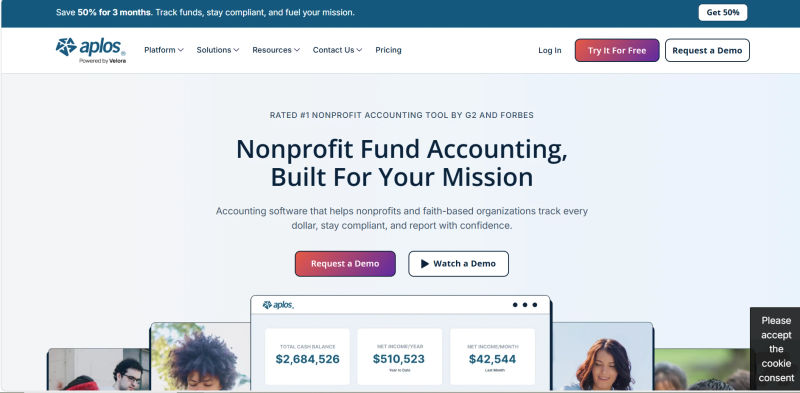
While this guide focuses on Aplos, it’s helpful to compare it against the most recognized Non-profit solutions.





What is Aplos? A High-Level Overview
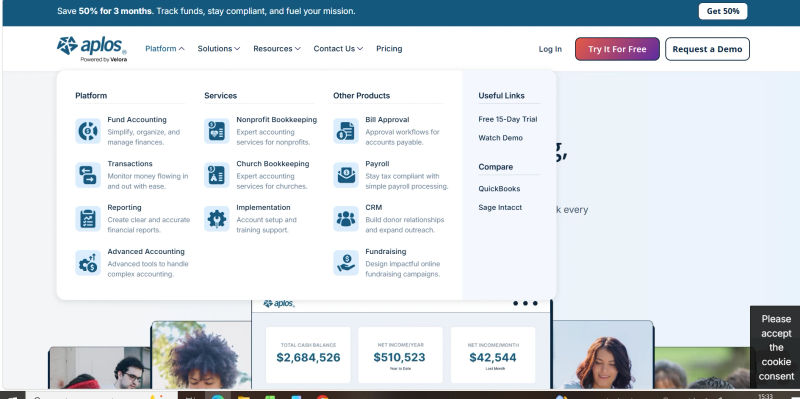
Aplos is a cloud-based software suite designed specifically for nonprofits and faith-based organizations. Founded to make fund accounting accessible, it has evolved into a robust "all-in-one" platform combining a true fund accounting system with a dynamic donor management CRM.
Can small nonprofits use Aplos to manage donor databases, online giving pages, and donation acknowledgment letters in one platform? Yes. Aplos eliminates the need for disconnected third-party apps by centralizing these tools. Core Aplos nonprofit software features include a unified donor database to track supporter history, customizable online giving pages to capture web donations, and automated donation acknowledgments for instant tax receipts and thank-you letters.
In 2026, Aplos serves users ranging from small church plants to mid-sized foundations. Its architecture supports unique sector reporting requirements, such as Form 990 preparation and tracking temporary versus permanently restricted funds, ensuring every dollar is tracked from donation to final expense allocation.
Security and User Permissions
For the financial decision-maker, security is non-negotiable. Aplos operates as a cloud-native solution, backed by industry-standard encryption and security protocols aligned with SOC2 standards to protect sensitive donor data. Crucially, the 2026 version has enhanced its user permission settings. Finance Directors can now grant "View Only" access to Board Members or Auditors, allowing stakeholders to review real-time financial health without the risk of accidental data modification. This transparency is vital for maintaining board confidence and fulfilling fiduciary duties.
Core Feature Analysis: Fund Accounting
Aplos provides fund accounting features specifically designed for nonprofits tracking restricted and unrestricted funds separately. Unlike commercial software, it natively tracks multiple funds within a single ledger, ensuring restricted grants are never mixed with unrestricted revenue.
Crucially, Aplos generates nonprofit-specific financial reports like the Statement of Financial Position and Statement of Activities for board reporting. It automatically produces these compliant statements broken down by fund. Across numerous Aplos fund accounting reviews, this ability to instantly generate accurate, board-ready reports without manual spreadsheet manipulation is highlighted as the platform's core advantage.
1. The General Ledger and Tagging Methodology
Aplos utilizes a tag-based system within its General Ledger (GL) that allows for multidimensional reporting. When a transaction is entered, it isn't just categorized by an expense account (e.g., "Office Supplies"); it is tagged by a specific fund (e.g., "Youth Ministry Restricted Fund"). This ensures that the organization can instantly view the balance of any specific fund without complex manual calculations. This architecture is critical for maintaining FASB ASU 2016-14 compliance, which mandates clear presentation of net assets with and without donor restrictions.
2. Audit Trails and Internal Controls
A major enhancement for 2026 is the robustness of the audit trail. For nonprofits facing annual independent audits, the integrity of the data is paramount. Aplos now provides an immutable log of every transaction entry, edit, and deletion. This log records the user ID, timestamp, and specific changes made, ensuring a complete chain of custody for financial data. This feature significantly reduces the time CPAs spend testing internal controls during an audit, potentially lowering billable audit hours.
3. Automated Expense Allocation
One of the most tedious tasks for nonprofit accountants is allocating shared costs—such as rent, utilities, or administrative salaries—across various programs to generate a Statement of Functional Expenses. Aplos streamlines this through automated allocation rules. Users can set up logic that automatically distributes expenses across program, management, and fundraising categories based on pre-set percentages. This automation ensures that the organization's functional expense ratio (a key metric for charity watchdogs) is calculated accurately and consistently.
4. Bank Reconciliation and AI Automation
For nonprofits streamlining their month-end close, Aplos AI significantly accelerates bank reconciliation. The system connects directly to live bank feeds and uses machine learning to automatically suggest matches between bank transactions and general ledger entries.
As you process data, the AI learns your categorization habits. For recurring expenses or donations, Aplos auto-tags the correct funds and accounts for quick review. This intelligent automation reduces manual data entry errors and cuts the reconciliation process from days to hours, allowing finance teams to focus on strategic analysis rather than tedious line-item matching.
5. Budgeting and Encumbrance
Effective financial management requires looking forward, not just backward. Aplos allows for granular budgeting at the fund level. Managers can set specific budgets for the "General Fund" separate from the "Building Campaign Fund." Furthermore, the system supports a form of encumbrance accounting, allowing organizations to track committed funds that haven't yet been spent. This visibility prevents the common pitfall of overspending simply because an invoice hasn't hit the books yet.
Core Feature Analysis: Donor Management & Fundraising
Aplos handles donor management and online giving by directly integrating its built-in CRM and fundraising tools with its fund accounting engine. When a supporter contributes via an Aplos online giving form, the platform automatically updates the donor's CRM profile, issues a receipt, and records the transaction in the general ledger. This seamless connection eliminates manual data entry, ensuring accurate, real-time contribution tracking and addressing the primary pain point of data reconciliation.
1. Unified CRM and Donor Profiles
The Aplos CRM is not a siloed database; it is an extension of the ledger. When a donor contributes, their profile is updated, and the transaction is simultaneously recorded in the accounting books. Each donor profile provides a 360-degree view of the constituent, tracking contact information, giving history, pledge progress, and communication logs. Users can segment these lists based on giving behavior—for example, filtering for "Lapsed Donors" who gave in 2024 but not 2025—to execute targeted re-engagement campaigns.
2. Handling Complex Split Gifts
A sophisticated feature often overlooked is the handling of split gifts. In many systems, if a donor writes a $1,000 check—$500 for the General Fund and $500 for the Building Fund—the entry process is cumbersome. Aplos handles this elegantly. The donation is recorded as a single transaction linked to the donor's profile, but the accounting entry automatically splits the revenue into the respective fund buckets in the General Ledger. This ensures the donor gets a single receipt for $1,000, while the accounting remains perfectly segmented.
3. Contribution Statements and Acknowledgments
IRS compliance requires timely and accurate contribution statements. Aplos automates this process. At year-end, or on a rolling basis, finance managers can generate and email tax-deductible giving statements directly from the system. The platform also supports automated donation receipts, ensuring that every gift is acknowledged immediately, which is a critical factor in maintaining a high donor retention rate.
4. Online Fundraising Tools
Aplos includes a suite of digital fundraising tools designed to capture revenue efficiently. This includes customizable donation forms that can be embedded on the nonprofit's website. These forms support one-time and recurring donations, the latter being essential for building predictable cash flow. Features like Text-to-Give and mobile-responsive widgets are standard, catering to the increasing percentage of donors who give via smartphones. The system also handles event registration, allowing organizations to sell tickets and track attendees within the same ecosystem where they manage their accounts.
Aplos Pricing 2026
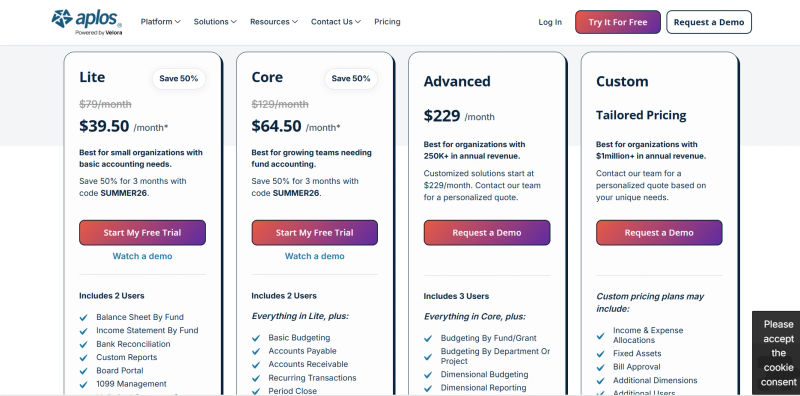
When evaluating Aplos nonprofit accounting pricing 2026, the platform remains a mid-market solution. Aplos pricing for nonprofits 2026 is tiered based on your total contacts and required features.
For organizations researching Aplos nonprofit accounting software pricing 2026, expect a base subscription that scales as your database grows. These Aplos pricing 2026 nonprofit plans offer a transparent structure compared to enterprise ERPs.
Plan | Price | Best For | Features |
Aplos Lite | $39.50 | Small nonprofits & church plants | • True Fund Accounting |
Aplos Core+ | $64.50 | Growing organizations needing compliance | • All Lite features |
Aplos Advanced | $229.00 | Mid-sized nonprofits & multi-entity orgs | • All Core+ features |
Note: Aplos pricing estimates reflect standard 2026 monthly billing and vary with annual contracts or contact volume add-ons.
Implementation and Hidden Costs
When budgeting for Aplos, Financial Managers must consider the Total Cost of Ownership (TCO). Beyond the monthly subscription, organizations should budget for implementation and onboarding fees. Depending on the complexity of your data migration and the need for training, Aplos offers coaching packages that typically range from $500 to $2,000. While optional, these services are highly recommended for organizations transitioning from legacy systems to ensure the Chart of Accounts is mapped correctly from day one. Additionally, credit card processing fees (standard industry rates) will apply to online donations.
Find Perfect Software for Your Business
Migration Checklist: Moving from QuickBooks to Aplos
For many organizations, the biggest hurdle is not selecting the software but moving the data. If you are transitioning from QuickBooks or Excel, use this checklist to ensure a smooth migration:
Cleanse Your Current Data: Before exporting anything, archive old donors who haven't given in 5+ years and close out inactive vendor accounts. Do not migrate "dirty" data.
Map Your Chart of Accounts: Aplos uses a tag-based structure. You will need to map your QuickBooks "Classes" or "Jobs" to Aplos "Funds" and "Tags." This is the most critical step for reporting accuracy.
Set a Cut-Over Date: Ideally, align your migration with the start of a fiscal year. If that isn't possible, choose a clean month-end. You will likely need to enter "beginning balances" for all funds as of that date.
Export and Import Donors: Export your donor list to CSV. Ensure columns for "First Name," "Last Name," and "Email" are formatted correctly for the Aplos importer.
Run Parallel Systems: For the first month, record transactions in both your old system and Aplos. Compare the Balance Sheets at month-end. If they match, you are safe to fully decommission the old system.
Top Aplos Alternatives for 2026
While Aplos is a strong contender, other platforms might offer a better fit depending on your organization's specific focus—be it peer-to-peer fundraising, deep data analytics, or advocacy.
When comparing Aplos vs Bloomerang for small nonprofits that need combined fund accounting and donor management without enterprise software complexity, Bloomerang is a standout alternative. While Aplos provides native fund accounting, Bloomerang focuses heavily on donor retention and integrates seamlessly with standard accounting tools, delivering a unified, user-friendly system without a steep learning curve.
1. Raisely: Best for Scalable Fundraising
If your organization's primary revenue stream is peer-to-peer (P2P) fundraising, Raisely is a formidable alternative. Unlike Aplos, which focuses heavily on the accounting back-end, Raisely is a frontend powerhouse. It allows nonprofits to build custom, high-converting fundraising websites and campaign pages with zero code. It excels in community engagement, allowing supporters to create their own fundraising profiles. However, Raisely is not an accounting system; it would need to be integrated with Xero or QuickBooks, meaning you lose the all-in-one benefit of Aplos but gain superior fundraising aesthetics and P2P functionality.
2. Keela: Best for Data-Driven Donor Insights
For organizations that prioritize donor intelligence over fund accounting, Keela is the industry leader. Keela's CRM is infused with artificial intelligence that suggests the "Smart Ask" amount for specific donors and predicts the best time to email them. Its reporting tools focus on donor retention and lifetime value rather than functional expenses. Like Raisely, Keela is primarily a CRM and fundraising tool; while it integrates with QuickBooks and Xero, it does not replace the accounting software. It is the best choice for development directors who need deep data to drive revenue growth.
3. Zeffy: The Zero-Fee Alternative for Small Nonprofits
When evaluating Aplos vs Zeffy, the distinction comes down to comprehensive accounting versus free fundraising. For small nonprofits where every cent counts, Zeffy (formerly Simplyk) disrupts the market with a 100% free model. Zeffy covers transaction fees for the nonprofit, funded entirely by voluntary tips from donors, and offers ticketing, donation forms, and basic donor management.
While Zeffy is an unbeatable option for grassroots organizations needing to accept payments without overhead, it lacks the sophisticated fund accounting, general ledger, and compliance features of Aplos. Zeffy is not a replacement for a true GL, but it serves as a powerful, zero-fee alternative to Aplos for the fundraising and basic CRM components.
4. Care2: Best for Advocacy and Audience Engagement
Care2 occupies a unique niche. It is important to clarify that Care2 is not a fund accounting system or a traditional CRM. Instead, it is a powerful donor acquisition and advocacy network. If your nonprofit relies on petitions, social justice campaigns, and recruiting new supporters from a global network, Care2 is the platform of choice. It connects you with millions of potential activists. It serves as a top-of-funnel acquisition channel that would feed data into a system like Aplos or Keela. It is listed here as an alternative investment for organizations prioritizing reach over management.
Note on Enterprise Options: For organizations with complex multi-entity structures or budgets exceeding $10M, mid-market tools like Aplos may eventually reach a ceiling. In such cases, enterprise ERPs like Sage Intacct or Blackbaud Financial Edge may be required, though they come with significantly higher implementation costs and complexity.
What CRM and Fund Accounting Software Do Nonprofits Over $10M Revenue Use?
While Aplos is an excellent fit for small to mid-sized organizations, enterprise nonprofits exceeding $10M in annual revenue typically outgrow its capabilities. If you are wondering what fund accounting software do nonprofits over $10m use?, organizations of this size require robust, enterprise-grade ERPs and CRMs that can handle complex multi-entity consolidations, advanced grant management, and high-volume donor data.
The most common fund accounting software used by nonprofits over $10m revenue includes Sage Intacct, Blackbaud Financial Edge NXT, and Oracle NetSuite for Nonprofits. This is the standard fund accounting software used by nonprofits over $10m because these platforms offer advanced audit trails, dimensional reporting, and the strict internal controls required by CFOs managing eight-figure budgets.
When evaluating the top nonprofit crm platforms for large organizations over $10m revenue 2025 2026, Salesforce Nonprofit Cloud and Blackbaud Raiser's Edge NXT dominate the market. What are the top nonprofit crm platforms for organizations over $10m in annual revenue? Beyond Salesforce and Blackbaud, enterprise organizations also heavily rely on Microsoft Cloud for Nonprofit. These systems stand out as the top nonprofit crm platforms for organizations over $10m annual revenue 2025 2026 (and remain the top nonprofit crm platforms for large organizations over $10m revenue 2025 or 2026) because they provide highly customizable donor journeys, predictive AI analytics, and seamless API integrations with enterprise ERPs.
Comparative Verdict: Which Software Should You Choose?
Selecting the right software requires mapping your organization's specific constraints and goals to the tool's strengths. To help you build a business case for your Board of Directors, consider this final breakdown.
Choose Aplos if:
Your top priority is FASB compliance and accurate fund accounting.
You want to eliminate the manual data entry between your donation pages and your bank ledger.
You are a faith-based organization or nonprofit that needs a single, unified source of truth for finance and development.
You need to generate Statements of Functional Expenses and Form 990 reports efficiently.
Choose Raisely if:
Your strategy relies heavily on peer-to-peer fundraising events (runs, walks, challenges).
You need highly customizable, branded fundraising pages.
You already have an accounting system (like Xero) that you are happy with.
Choose Keela if:
You have a dedicated development team focused on maximizing donor lifetime value.
You need AI-driven insights to segment your audience and automate email marketing.
You are willing to maintain a separate accounting software stack.
Choose Zeffy if:
You have a budget of $0 for software.
You are a small, volunteer-run organization that needs simple ticketing and donation processing.
Choose Care2 if:
Your mission is advocacy-driven (environmental, human rights, animal welfare).
You need to acquire new emails and supporters outside of your current network.
Questions to Ask During Your Demo
Before signing a contract, pressure-test the sales representative with these questions:
"Can you show me exactly how a split gift of $100 ($50 restricted, $50 unrestricted) appears on the Statement of Activities?"
"What is the typical implementation timeline for an organization of our size, and does the quoted price include data migration support?"
"How does the system handle 'View Only' permissions for our external auditor?"
"Can I see the export format for the Form 990 report?"
Try AuthenCIO
Move to faster, smarter software evaluation with AI
Conclusion
In 2026, the divide between "accounting software" and "fundraising software" continues to blur, but the distinction remains critical for compliance. Aplos stands out as one of the few platforms that genuinely bridges this gap, offering a sanctuary for the Nonprofit Financial Manager who demands the rigor of true fund accounting alongside the agility of modern donor management. By centralizing the General Ledger and the CRM, Aplos offers a pathway to operational efficiency that disparate systems simply cannot match.
However, the "best" software is always relative to the user's needs. For organizations prioritizing sheer fundraising growth, Raisely or Keela may offer superior marketing tools. For those strictly managing costs, Zeffy provides an essential service. The key is to assess your organization's maturity, budget, and compliance risks. Investing in the right infrastructure today is not just an operational decision; it is a strategic move to ensure your mission's longevity and transparency.