
Introduction
What is a donor CRM? A donor CRM (Customer Relationship Management) system is a specialized software platform designed to track, manage, and optimize a nonprofit's interactions with its financial supporters, volunteers, and advocates. In today's landscape, a dedicated donor management CRM has replaced static spreadsheets to become the central nervous system of a nonprofit’s operations, driving everything from acquisition to retention through sophisticated moves management strategies.
Streamline your software evaluation process
For Executive Directors and Development Directors, the pressure to demonstrate impact while minimizing overhead is intense. The reliance on disparate tools—email marketing in one silo, donation processing in another, and volunteer data in a third—creates dangerous data silos. These silos fragment the donor view, making it nearly impossible to execute a cohesive omnichannel stewardship strategy. When donor data is scattered, opportunities for engagement are lost, and the risk of donor churn increases significantly.
Effective CRM donor management addresses these pain points by centralizing data into a single source of truth. This centralization allows for the implementation of structured best practices, such as systematically moving a prospect from an initial interest to a major gift. Unlike a standard sales CRM, a purpose-built donor CRM understands the nuances of the nonprofit lifecycle, prioritizing long-term relationship building over transactional quick wins. By leveraging specialized donor management software, organizations can shift their focus from manual data entry to high-value activities, such as personalizing donor interactions and analyzing retention metrics that truly move the needle.
Key Takeaways
Top Platform Picks: Aplos is ideal for 360-degree donor views and fund accounting; Keela stands out for AI-driven predictive analytics and donor scoring; and Raisely is the go-to for customizable peer-to-peer donation forms.
Essential Capabilities: A modern nonprofit CRM must include automated task workflows, household relationship linking, built-in data hygiene (such as address validation), and mobile-first access for field fundraisers.
Strategic Best Practices: Future-proof your tech stack by prioritizing open API integrations, strict data privacy compliance, and out-of-the-box reporting for LYBUNT/SYBUNT metrics.
🏆 Top Software Picks
Aplos — Best for donor management with integrated fund accounting.
Keela — Best for AI-driven donor insights and fundraising optimization.
Raisely — Best for digital and peer-to-peer fundraising campaigns.
DonorPerfect — Best for comprehensive donor management and engagement.
Givebutter — Best for modern, multichannel nonprofit fundraising.
Zeffy — Best for zero-fee fundraising and donation management.
GoFundMe Pro — Best for large-scale digital fundraising campaigns.
Care2 — Best for supporter acquisition and cause-based engagement
Software covered in this article
To help you evaluate donor management crm in the right context, this article compares it against a carefully curated set of competitors:




Core Features of a Nonprofit Donor Database
When determining what features are essential in a donor management system, organizations must look beyond basic contact storage. Nonprofits build complex relationships with constituents who are simultaneously donors, volunteers, and board members. A generic platform often struggles here, whereas a specialized best donor management CRM delivers tailored nonprofit donor management capabilities.
Core CRM features include:
360-Degree Profiles: Centralized tracking of multi-faceted constituent identities.
Relationship Linking: Connecting households and corporate matches.
Gift Tracking: Processing one-time and recurring donations.
Data Hygiene: Automated duplicate merging and address validation.
1. 360-Degree Donor Views (Example: Aplos)
A true 360-degree donor view aggregates every interaction a constituent has with your organization into a single, comprehensive profile. This includes donation history, event attendance, volunteer hours, email open rates, and even communication preferences.
Aplos serves as a prime example of how deep data integration can streamline operations. Small nonprofits can use Aplos as an all-in-one platform to manage donor databases, host online giving pages, and automate donation acknowledgment letters in a single system, eliminating the need for disjointed software subscriptions.
While many platforms handle donor data well, Aplos further distinguishes itself by integrating fund accounting directly with donor management. This is a critical feature for nonprofits that need to ensure every dollar donated is restricted to the correct fund and reported accurately to the board.
In a typical scenario without such integration, the development team’s records might differ from the finance team’s general ledger, leading to reconciliation nightmares. Aplos solves this by ensuring that when a donation is logged in the CRM—whether through an online giving page or manual entry—it is automatically reflected in the accounting system and triggers the appropriate acknowledgment letter, maintaining data integrity and saving countless hours of administrative work.
Furthermore, a robust profile must handle the complexities of soft credits and hard credits. If a donor gives through a family foundation or a donor-advised fund (DAF), the hard credit (legal receipt) goes to the entity, but the soft credit (recognition) must go to the individual. Failing to track this accurately can lead to insulting your major donors by under-recognizing their actual contribution level.
2. Household and Relationship Linking
Beyond the individual, nonprofits must track networks. Best practices for donor profile tracking in a nonprofit CRM require linking individual profiles into unified households and organizational structures. This improves data utility by preventing duplicate outreach—like sending multiple appeal letters to the same address—which wastes postage and appears disorganized.
Advanced relationship linking maps complex connections. Tracking that Donor A works for Company B and is married to Board Member C unlocks actionable insights. Maintaining these relationship webs is a core best practice, providing the visibility needed to identify networking opportunities, manage soft credits, and leverage peer-to-peer influence in fundraising campaigns.
3. Data Hygiene and Address Validation
Even the most sophisticated CRM is rendered useless by "dirty data." Duplicate entries and outdated addresses are silent budget killers. A robust system must offer built-in data hygiene tools, including automated deduplication logic that identifies that "Robert Smith at 123 Main St" is the same constituent as "Bob Smith at 123 Main St."
Additionally, look for integration with NCOA (National Change of Address) registries. This feature automatically updates donor addresses when they move, ensuring your direct mail appeals actually reach their destination. By maintaining a clean database, you not only save on postage and printing costs but also improve your email deliverability rates and overall donor engagement metrics.
Fundraising Intelligence and Automation
As we navigate a data-rich environment, the expectation for personalization is higher than ever. Donors expect organizations to know them, understand their giving capacity, and communicate relevantly. This is where fundraising intelligence and automation come into play, transforming raw data into actionable insights.
1. Predictive Analytics and Donor Scoring (Example: Keela)
If you are evaluating what's the best nonprofit CRM for predictive donor scoring, Keela is the top choice. Static data tells you what happened in the past; predictive analytics tells you what is likely to happen in the future. Leading CRMs now incorporate Artificial Intelligence (AI) to score donors based on their likelihood to give, their potential gift size, and their risk of churning.
Keela excels in this category by utilizing AI-driven tools to optimize fundraising efforts without requiring an in-house data scientist. Keela’s system analyzes historical giving patterns to suggest the perfect "Smart Ask" amount for each individual donor. Instead of sending a generic request for $50 to your entire list, Keela’s algorithms might suggest asking Donor X for $25 (based on their history) and Donor Y for $500. This level of personalization significantly increases conversion rates.

While AI can present a learning curve, the best platforms make these insights accessible through a user-friendly interface that explains why a donor is scored a certain way. Keela utilizes RFM analysis (Recency, Frequency, Monetary) to segment donors automatically, identifying "Champions" versus "At-Risk" donors. This intelligence allows development officers to prioritize their portfolios, focusing their limited time on the prospects with the highest potential return on investment (ROI).
2. Automated Workflows and Task Management
A nonprofit CRM supports donor stewardship at scale by replacing manual follow-ups with automated workflows and task assignments, ensuring no supporter falls through the cracks as your donor base grows. Automation acts as the primary antidote to staff burnout. In a manual workflow, a donor might receive a generic receipt immediately, but the crucial follow-up—a handwritten note or a phone call—often gets delayed.
Modern CRMs allow you to build automated stewardship sequences that handle high volumes of interactions effortlessly. For example, you can set specific system triggers: "If a donor gives over $500, assign a task to the Executive Director to call them within 48 hours." Or, "If a first-time donor gives, enter them into a 3-part email welcome series." These automated sequences ensure that every donor receives a consistent, high-quality experience without requiring manual intervention for every step. This scalable consistency is vital for improving donor retention rates, which research from the Fundraising Effectiveness Project consistently shows is a major challenge for the sector.
Campaign Management and Online Giving
The friction between a donor’s impulse to give and the completion of the transaction must be zero. Your CRM’s ability to manage campaigns and facilitate online giving is a direct driver of revenue.
1. Customizable Donation Forms and Peer-to-Peer Capabilities (Example: Raisely)
Your donation form is the most critical conversion point in your digital fundraising strategy. It must be mobile-responsive, brand-aligned, and easy to use. Raisely excels here, offering highly customizable donation forms and peer-to-peer (P2P) fundraising campaigns without requiring a developer. Raisely seamlessly captures fundraiser and new donor data into its CRM ecosystem, organically expanding your donor base.
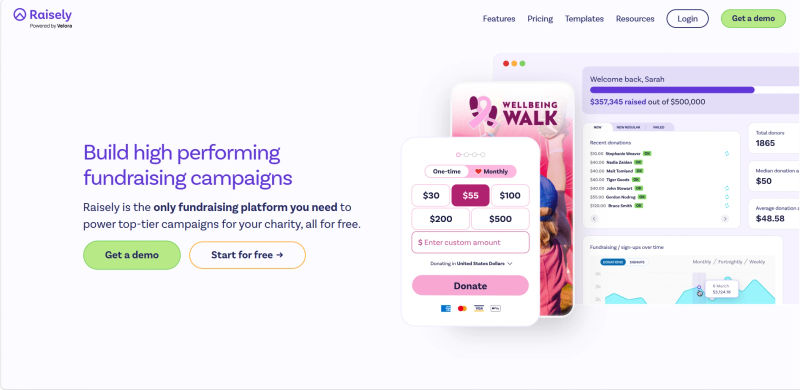
When asking which donor management platforms maximize funds raised by minimizing platform fees and manual data entry, the comparison often comes down to Raisely and Zeffy. Raisely relies on a "Cover the Fees" option, asking donors to add a small percentage to cover credit card processing.
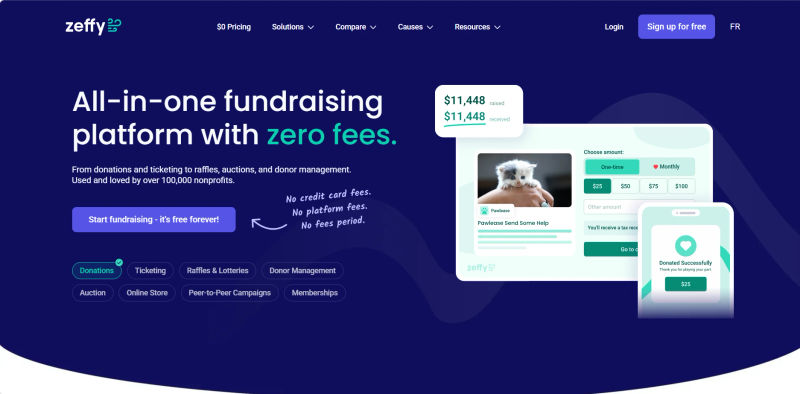
Conversely, how do development directors rate Zeffy's donation form and donor CRM tools for small nonprofits maximizing revenue by eliminating transaction fees? They rate it exceptionally well. Zeffy operates on a true zero-fee model, covering all processing costs by asking donors for an optional tip to the platform. This ensures 100% of the gift goes to your mission. While Raisely offers superior P2P customization and frictionless UX to reduce cart abandonment, Zeffy provides a highly effective, budget-friendly alternative for small organizations prioritizing zero transaction fees and automated data entry.
2. Recurring Giving Management
If you are wondering what's the best nonprofit CRM for boosting recurring donation conversion rates, look for platforms like Raisely or Keela that feature specialized subscription automation. To maximize monthly giving, your CRM needs automated upgrade prompts (asking one-time donors to switch to monthly at checkout) and AI-driven ask amounts.
Automated dunning tools are equally critical. A robust CRM handles expired credit cards effortlessly by triggering automated emails to recover revenue lost to involuntary churn. Finally, providing a self-service donor portal allows supporters to update payment methods, adjust giving dates, or upgrade recurring amounts, reducing administrative burden while boosting long-term retention.
Mobile-First Fundraising and Field Access
Fundraising rarely happens exclusively behind a desk. Major gift officers, Executive Directors, and event managers are often "road warriors," meeting donors in coffee shops, boardrooms, or at gala events. A CRM that lacks a robust mobile interface creates a significant bottleneck in the stewardship cycle.
Modern donor management software must offer a mobile-first experience or a dedicated app. This allows staff to pull up a donor’s profile moments before a meeting to refresh their memory on the spouse’s name or the last gift date. More importantly, it enables immediate data entry. Instead of scribbling notes on a napkin and hoping to transcribe them later (a process prone to error and delay), a gift officer can dictate interaction notes directly into the CRM via their smartphone immediately after the meeting. This real-time data capture ensures that the entire team has visibility into the latest donor interactions, preventing embarrassing cross-communication errors.
Find Perfect Software For Your Business
Reporting, Analytics, and Data Governance
Data is useless if it cannot be interpreted. The ability to generate accurate, timely reports is essential for transparency with the Board of Directors and for making strategic decisions.
1. Custom Dashboards and LYBUNT/SYBUNT Reporting
Executive dashboards should provide a real-time pulse of the organization’s health. Key metrics like total revenue year-to-date, donor retention rate, and average gift size should be visible at a glance.
Specific to nonprofits are LYBUNT (Last Year But Unfortunately Not This Year) and SYBUNT (Some Year But Unfortunately Not This Year) reports. These reports are the gold standard for donor recapture campaigns. A good CRM allows you to generate a LYBUNT report with one click, instantly creating a call list of donors who supported you last year but haven't renewed their support yet. This targeted approach is far more effective than "spray and pray" mass appeals.
Furthermore, reporting should extend to campaign attribution. You need to know not just how much money was raised, but where it came from. Did the email blast perform better than the direct mail piece? Advanced reporting tools allow for this level of granularity, enabling you to optimize your marketing spend based on benchmarks like those found in the M+R Benchmarks Report.
2. Security, Privacy, and Compliance
With great data comes great responsibility. Nonprofits handle sensitive personal and financial information. Your CRM must adhere to strict security standards. This includes PCI-DSS compliance for processing payments securely (see PCI Security Standards).
Additionally, if you have international donors or operate in states with strict privacy laws, your system must support compliance with regulations like GDPR (see GDPR.eu) and CCPA. Regular audit logs should also be available to track who accessed or modified data, providing an internal layer of security against data misuse and ensuring you meet the standards often required for SOC 2 compliance.
Integration Ecosystems and API Accessibility
No software exists in a vacuum. Even the most comprehensive CRM needs to talk to other tools. A robust integration ecosystem is a non-negotiable feature for modern nonprofits.
At a minimum, your CRM should integrate with:
Email Marketing Platforms: (e.g., Mailchimp, Constant Contact) to sync lists and segments.
Accounting Software: (e.g., QuickBooks, Xero) if not built-in like Aplos, to reconcile deposits.
Payment Gateways: (e.g., Stripe, PayPal) to process funds securely.
For larger organizations or those with custom tech stacks, an open API (Application Programming Interface) is essential. An API allows developers to build custom connections, ensuring that your CRM can scale and adapt as your organization’s needs become more complex. This extensibility prevents you from outgrowing your software too quickly.
Comparing Aplos, Keela, and Raisely
When evaluating the best nonprofit CRM platforms for executive directors managing donor tracking and fundraising campaigns, the priority is consolidating disparate systems. Executive directors and development teams need a single source of truth for fundraising, events, and donor management. Here is how these three platforms compare for nonprofit leaders.
Aplos is a nonprofit CRM most used by executive directors for consolidating fundraising, events, and donor management alongside fund accounting. It eliminates the disconnect between development and finance. If your organization needs a true all-in-one back-office solution to track donations, manage event registrations, and reconcile the books in one place, Aplos offers a streamlined approach.
Keela ranks among the top CRM platforms for nonprofit major gifts officers and development directors who rely on data-driven intelligence. Its predictive analytics and "Smart Ask" technology act as a force multiplier for development teams. If your primary goal is to increase donor retention, optimize major gift portfolios, and automate donor tracking without hiring a data scientist, Keela’s intelligent automation is the differentiator.
Raisely shines for organizations that rely heavily on digital engagement, peer-to-peer fundraising, and custom branding. For executive directors managing complex fundraising campaigns and community-led events, Raisely provides flexible front-end tools. Its zero-platform-fee model makes it a powerful engine for acquisition-focused nonprofits looking to scale their online giving and event management.
Implementation and Support Models
Selecting the right software is only half the battle; implementing it successfully is the other half. The level of support and training provided by the vendor can make or break your ROI. Nonprofits often underestimate the "change management" required to move a team from legacy processes to a modern SaaS platform.
Vendors typically offer varying tiers of implementation support. It is crucial to evaluate your internal technical capacity before choosing a model. A lower-cost tool with zero support might end up costing more in lost productivity than a premium tool with guided onboarding.
Comparison of Support Models
Feature | Self-Service Model | Guided Model | Dedicated Model |
Ideal For | Small teams, tech-savvy staff, limited budget. | Mid-sized orgs, complex data migration needs. | Large institutions, custom workflows, huge databases. |
Data Migration | DIY via CSV import tools. | Vendor-assisted mapping and import. | Full-service migration by engineers. |
Typical Timeline | 1-2 weeks (dependent on staff time). | 30-60 days. | 90+ days. |
Training | Knowledge base, video tutorials, community forums. | Live webinars, dedicated onboarding calls. | On-site training, custom documentation. |
Support Access | Email/Ticket support with 24-48hr SLA. | Chat/Phone support, priority queue. | Dedicated Account Manager, 24/7 emergency line. |
Cost Implication | Low initial fee, high hidden cost of staff time. | Moderate setup fee, faster time-to-value. | High setup fee, lowest risk of failure. |
Try AuthenCIO
Move to faster, smarter software evaluation with AI
Conclusion: Future-Proofing Your Tech Stack
Choosing a Donor Management CRM is a strategic decision that impacts every facet of your organization’s sustainability. It requires looking beyond the immediate price tag to consider the Total Cost of Ownership (TCO), which includes implementation time, training, and the potential revenue lost from inefficient systems.
Whether you prioritize the fund accounting integration of Aplos, the fundraising intelligence of Keela, or the customizable campaign power of Raisely, the goal remains the same: to build deeper, more meaningful relationships with your supporters. By focusing on features that drive automation, data hygiene, and stewardship, you position your nonprofit to thrive. The right tool will not just store your data; it will unlock the potential of your community.
CRM Evaluation Checklist
Before signing a contract, ensure your team has validated the following:
Data Portability: Can we easily export our data if we leave?
Hidden Costs: Are there extra fees for additional contacts, users, or storage?
Mobile Access: Have field staff tested the mobile interface?
Integration: Does it sync with our existing email and accounting tools?
Support SLA: Is the guaranteed response time acceptable for our needs?