

Introduction
In the rapidly evolving landscape of digital marketing, the separation between Customer Relationship Management (CRM) and email automation is no longer just an inconvenience—it is a critical operational failure.
Streamline your software evaluation process
By 2026, the most successful marketing specialists and small business owners have realized that data silos are the enemy of ROI. Enter Transpond, an email marketing solution that has positioned itself not merely as a newsletter dispatcher, but as a sophisticated extension of your CRM infrastructure.
For decision-makers navigating the crowded software market to find the best email marketing tools for small business, the choice is often between distinct, disconnected tools or an all-in-one ecosystem.
Transpond bridges this gap, particularly for users of Capsule, by offering deep integration that promises to turn static contact lists into dynamic, revenue-generating assets. With email marketing ROI hitting an average of 45:1 in the retail and ecommerce sectors in 2026, the stakes for selecting the right infrastructure are incredibly high.
This review provides an authoritative, deep-dive analysis of Transpond’s capabilities in 2026. We will dissect its campaign automation, scrutinize its CRM synchronization, evaluate the user experience from the initial Transpond login to advanced workflow creation, and rigorously compare it against industry heavyweights like Keap, Brevo, and ActiveCampaign. Whether you are a marketing specialist tasked with improving lead nurturing or a business owner seeking to streamline your tech stack, this review serves as your roadmap.
Key Takeaways:
Transpond is a dedicated email marketing and automation platform (note: it is completely distinct from the B2B lead generation service Salespond).
The platform excels at deep, native CRM integrations—particularly with Capsule—to eliminate data silos.
The streamlined Transpond login experience immediately drops users into a unified dashboard bridging CRM contacts and campaign analytics.
Transpond Review — CRM-Connected Email Automation
What Works Well
Deep CRM integration: Transpond’s strongest advantage is its close integration with Capsule CRM, allowing customer and engagement data to move between sales and marketing workflows.
Advanced automation: Marketers can build multi-step workflows triggered by subscriber behavior, CRM updates, and engagement.
Dynamic content: Emails can automatically display different content based on CRM tags and customer information.
Lead scoring: Engagement actions such as clicks and opens can contribute to lead scores, helping sales teams identify more engaged prospects.
Detailed analytics: Click maps, engagement reporting, and CRM-connected campaign data provide deeper visibility into subscriber behavior.
AI-assisted content: AI tools can help create email copy while maintaining a specified brand tone.
Strong B2B focus: The platform is well suited to nurturing leads and maintaining ongoing customer relationships.
Where It Falls Short
Capsule-centric experience: Users of Capsule CRM get the deepest integration, while other CRM connections may require middleware or additional technical setup.
Less omnichannel coverage: Businesses looking for native SMS, WhatsApp, or broader multichannel campaigns may need another platform.
Setup can take time: Advanced automation and CRM synchronization require more configuration than basic email tools.
Migration is largely self-service: Businesses moving from another platform may need to handle data mapping, template recreation, and other migration tasks themselves.
Not designed for every use case: Teams needing highly complex enterprise automation or extensive predictive capabilities may find more specialized alternatives suitable.
Verdict: Transpond is a strong fit for businesses that want CRM-driven email automation, clean data synchronization, and practical lead nurturing without enterprise-level complexity.
Best For: Small and mid-sized B2B businesses, especially Capsule CRM users that want their sales data and email marketing workflows closely connected.
Software covered in this article
To help you evaluate Transpond in the right context, this article compares it against a carefully curated set of competitors:






Understanding Transpond: The Synergy of Email Marketing and CRM
Originally known for MPZMail email marketing, the platform rebranded to reflect its evolution from basic newsletters to advanced automation. The Transpond meaning derives from "transponder"—a device that receives a signal and automatically transmits a reply. This encapsulates the platform's core function: listening for CRM data signals to trigger highly personalized, automated responses.
Gone are the days of "batch-and-blast" campaigns. Today's email efficacy requires real-time data access. Transpond was architected with a "CRM-first" mentality, focusing on native synchronization rather than treating integration as an afterthought via third-party connectors.
Transpond pulls data directly from your CRM—specifically Capsule, though it supports others—to inform marketing actions instantly. If a sales representative updates a lead status from "Prospect" to "Negotiation," Transpond immediately receives that signal and triggers a specific nurturing sequence without manual CSV exports or API delays.
The Cost of Latency
Consider a scenario common in disjointed stacks: A prospect downloads a pricing guide (high intent). In a system relying on a slow 4-hour sync cycle, that lead might not receive a follow-up until they have already moved on to a competitor's site.
Transpond’s near-instantaneous data handshake addresses this major pain point for small businesses, eliminating the lag time between sales intelligence and marketing action.
For marketing specialists, this translates to a reduction in administrative overhead. You are no longer managing two separate databases. Instead, Transpond acts as the execution arm of your CRM’s brain. This architectural difference is vital when comparing it to legacy tools that still rely heavily on static lists. In 2026, where zero-party data and consent-based marketing are paramount, having a single source of truth ensures compliance and relevance.
Core Features: Beyond Basic Email Dispatch
While integration is its flagship differentiator, Transpond is a robust email marketing platform in its own right. It offers a suite of tools designed to facilitate the creation, execution, and analysis of sophisticated campaigns.
1. Visual Drag-and-Drop Editor and Dynamic Content
The 2026 iteration of Transpond features a refined visual editor that rivals the ease of use found in Mailchimp or Brevo. However, the real power lies in its dynamic content insertion.
Users can create a single email template where specific content blocks—images, text, or CTAs—change based on the recipient's CRM tags or custom fields. For instance, a real estate agency can send a single newsletter that automatically displays commercial properties to B2B leads and residential listings to B2C clients, all driven by the data residing in the CRM.
2. AI-Driven Content: Ensuring Brand Voice Consistency
Reflecting the 2026 email marketing trends, Transpond has integrated generative AI features. Beyond simply curing writer's block, the 2026 updates focus on Brand Voice Consistency.
Decision-makers often fear that AI tools will make their communications sound generic. Transpond’s AI allows you to input specific tone guidelines (e.g., "Professional yet approachable," "Technical and authoritative") to ensure that subject lines and body copy align with your established brand identity. This is crucial for maintaining trust in automated sequences where human oversight is minimal.
3. Granular Analytics and Heatmaps
Data is useless without interpretation. Transpond provides detailed reporting that goes beyond open and click-through rates (CTR). It offers click maps (heatmaps) that visualize exactly where users are engaging within the email.
Furthermore, because of the CRM integration, these analytics are not siloed. Engagement data is pushed back into the CRM, allowing sales teams to see exactly which content a prospect interacted with before a call. This "closed-loop" reporting is essential for attribution modeling.

Advanced Campaign Automation and Behavioral Triggers
Automation is where Transpond transitions from a communication tool to a revenue engine. In 2026, automation capabilities are standard, but the flexibility of behavioral triggers sets platforms apart. Transpond allows for multi-step workflows that react to user behavior in real-time.
1. Marketing Automation ROI: Measuring Impact
To truly justify the investment, one must look at marketing automation** ROI**. By automating repetitive touchpoints, businesses using Transpond often see a reduction in customer acquisition costs (CAC) and an increase in lifetime value (LTV).
The platform allows you to tag users based on engagement levels, effectively bubbling up the "hottest" leads to the top of the sales pile without manual intervention.
2. Essential Automation Workflow Templates
For those seeking immediate implementation, Transpond supports several high-impact workflows out of the box. Here are three essential templates you can configure in under an hour:
1. The "Warm Welcome" Nurture Sequence
Trigger: New contact added to Capsule with tag "Newsletter Subscriber".
Step 1: Send "Welcome & Value Prop" email immediately.
Step 2: Wait 3 days.
Step 3: Send "Educational Content / Case Study" email.
Step 4: Condition: Did they click the link in Email 2? - Yes: Apply tag "Engaged Lead" in CRM.
No: Send "Soft Check-in" email 5 days later.
2. The Re-Engagement / Win-Back Campaign
Trigger: Contact has not opened an email in 90 days (Segment-based trigger).
Step 1: Send "Is this still relevant?" email with a special offer or update preferences link.
Step 2: Wait 7 days.
Step 3: Condition: If no open/click, automatically unsubscribe or move to "Cold Leads" segment to protect deliverability rates.
3. The Post-Purchase Review Request
Trigger: CRM Opportunity Stage changes to "Closed Won".
Step 1: Wait 7 days (to allow product usage).
Step 2: Send "How did we do?" email with a link to G2 or Google Reviews.
Step 3: If clicked, create a task in CRM for the Account Manager to send a personal thank you note.
3. Lead Scoring Models
Transpond supports lead scoring, a feature often reserved for more expensive platforms like ActiveCampaign or Keap. By assigning point values to specific actions (e.g., +10 points for a link click, +5 points for an open), marketers can quantify prospect interest.
Once a lead crosses a threshold, an automation rule can trigger a direct sales outreach task. This aligns marketing and sales efforts, ensuring that high-value prospects are prioritized immediately.
Find Perfect Software For Your Business
Native CRM Integration: Syncing with Capsule, Salesflare, and Streak
The true test of Transpond is its integration capabilities. While it is owned by the team behind Capsule, its utility extends to other CRM platforms via API and middleware.
1. The Capsule CRM Ecosystem
For Capsule users, Transpond is the default choice. The integration is native and bi-directional. Contact views in Capsule include a sidebar showing Transpond activity—opens, clicks, and campaign history.
Segmentation in Transpond is dynamic; if you create a "Lost Leads" list based on Capsule tags, that list updates automatically in real-time. This eliminates the need for manual CSV uploads, reducing the risk of data obsolescence and compliance violations.
Connecting with Other CRMs: An Effort Analysis
For users not on Capsule, the integration experience varies. Here is an implementation effort analysis for common alternatives:
Salesflare: - Integration Method: Zapier or Make (Middleware).
Effort Score: Medium (3/5). Requires setting up triggers for new contacts and tag updates. Not real-time native sync.
Best For: Teams who need simple "New Lead -> Add to List" automation.
Streak: - Integration Method: API / Zapier.
Effort Score: High (4/5). Since Streak lives inside Gmail, connecting it to an external dashboard like Transpond can feel disjointed. You will likely need to map custom columns in Streak to custom fields in Transpond manually.
Best For: Users who want to move mass marketing out of Gmail to protect their domain reputation.
PipelinePRO: - Integration Method: Webhooks.
Effort Score: High (4/5). Requires technical knowledge to set up webhooks that fire on pipeline stage changes.
Best For: Advanced marketers who want to trigger emails based on specific funnel movements.
Transpond Pricing 2026: Detailed Plan Breakdown
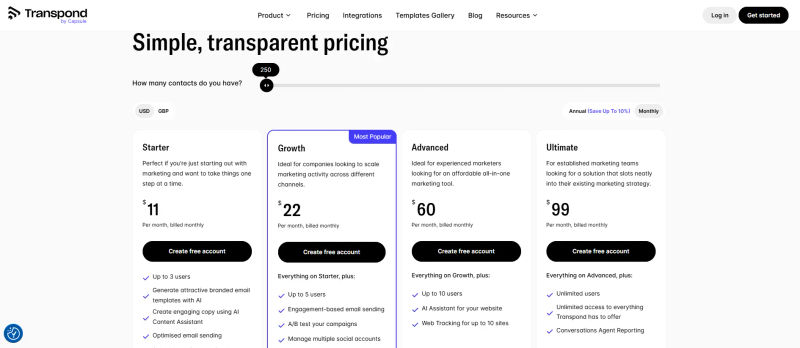
Transpond’s pricing strategy in 2026 remains competitive, targeting the SME market that finds enterprise tools cost-prohibitive. They typically offer a tiered structure based on contact count rather than feature gating, although higher tiers unlock advanced automation and priority support.
Pricing & Feature Comparison Table
Plan | Pricing | Best For | Features |
Free | Free | Getting started with email marketing basics | • Basic email marketing |
Starter | $11/month | Beginners and small businesses | • Up to 3 users |
Growth | $22/month | Companies scaling marketing across multiple channels | • Up to 5 users |
Advanced | $60/month | Experienced marketers seeking an all-in-one marketing platform | • Up to 10 users |
Ultimate | $99/month | Established marketing teams | • Unlimited users |
Note: Prices are estimated based on 2026 market standards for contact tiers starting at 2,500 contacts for paid plans. Regarding "Unlimited Sends," Transpond maintains a fair usage policy to prevent spam abuse, which is standard industry practice.
Transpond vs. The Market: Comparing Top Alternatives
In 2026, the email marketing software market is projected to be dominated by SMEs seeking efficiency. To make an informed decision, we must break down how Transpond compares to specific competitors mentioned in the brief.
1. Transpond vs. Keap
Keap is the automation powerhouse for service-based businesses. It combines CRM, email marketing, and invoicing into one monolithic platform.
The Verdict: If you want an "operating system" for your business where appointments, payments, and emails live in one login, Keap is superior. However, Transpond is the better choice if you already have a CRM you like (specifically Capsule) and just need a specialized marketing engine. Keap has a steeper learning curve and a significantly higher price point.
2. Transpond vs. Brevo (formerly Sendinblue)
Brevo is a strong alternative for businesses that need to scale volume cheaply or require omnichannel features.
The Verdict: Brevo charges by email volume, not contact count. If you have a massive list of 50,000 contacts but only send one newsletter a month, Brevo will be cheaper than Transpond. Additionally, Brevo offers native SMS marketing and WhatsApp campaigns, which Transpond lacks. Choose Transpond for deep CRM data syncing; choose Brevo for multi-channel broadcasting.
3. Transpond vs. ActiveCampaign
ActiveCampaign remains the leader in Customer Experience (CX) automation and predictive intelligence.
The Verdict: ActiveCampaign is in a different weight class. Its "site tracking" and predictive sending features (sending emails when a user is most likely to open) are far more advanced than Transpond’s. If you need complex if/then logic nested ten layers deep, ActiveCampaign is the tool. However, for a straightforward B2B nurture sequence, ActiveCampaign is often overkill and over-budget for small teams.
4. Transpond vs. PipelinePRO
PipelinePRO is aggressive on lead generation and sales funnels.
The Verdict: PipelinePRO is less of a direct email marketing competitor and more of a sales pipeline tool with marketing features attached. It excels at "churn and burn" lead gen and landing page creation. If your focus is high-velocity sales funnels, PipelinePRO offers better funnel-building tools. Transpond is superior for long-term relationship nurturing and newsletter engagement.
5. Transpond vs. Streak & Salesflare
Streak and Salesflare are CRMs first, with email features added on.
The Verdict: Streak lives entirely inside Gmail. If you use Streak, Transpond’s external dashboard might feel like a workflow interruption. However, Streak’s native mass email tools are limited to "mail merges" and lack visual automation builders. If you need true behavioral automation (e.g., "If clicked link, wait 2 days"), you must use Transpond. Salesflare users will find Transpond a good companion, but will need to rely on Zapier for the connection.
Implementation Strategy: Optimizing Your Marketing Stack
Adopting Transpond in 2026 requires a strategic approach to migration and configuration. Simply importing a CSV file is not enough to leverage the tool's full potential.
1. Step-by-Step Migration Checklist
Moving from a legacy email platform to a unified omni-channel CRM? Follow this checklist to ensure zero data loss and enable cross-channel automation:
Audit & Cleanse (Day 1): Export lists from your legacy platform. Remove hard bounces and unengaged contacts. Format all phone numbers with international country codes for WhatsApp compatibility.
Omni-Channel Data Mapping (Day 2): To migrate customer data for behavioral triggering, import cleansed data into your unified CRM. Map legacy lists to CRM tags and ensure custom fields for email addresses and WhatsApp-enabled phone numbers are explicitly linked.
Authentication & API Setup (Day 3): Configure SPF and DKIM records for email deliverability. Simultaneously, authenticate your native WhatsApp Business API credentials within the CRM to enable cross-channel behavioral triggers.
Template & Workflow Recreation (Day 4): Rebuild core email templates in Transpond. Recreate behavioral workflows (e.g., triggering a WhatsApp alert if a critical email remains unopened).
The "Warm-Up" (Day 5-14): Scale sending volume gradually. Send to your most engaged 500 contacts first to build ISP sender reputation and verify WhatsApp deliverability.
2. Time to Value
Realistically, a marketing specialist can set up the integration and launch the first simple campaign within 4 to 6 hours.
However, full migration including automation replication and domain warming typically takes 2 weeks to reach full operational capacity.
Customer Support & Migration Resources
For small businesses, the quality of support is often as important as the feature set. Transpond offers distinct support tiers that decision-makers should note.
Live Chat vs. Email: Users on the Plus plan and below generally rely on email support, which can have a turnaround time of 12-24 hours. Pro plan users gain access to priority support and, in some regions, phone support. If you are launching time-sensitive campaigns, the Pro plan is recommended for the faster support SLA.
Migration Services: Unlike some enterprise competitors (like ActiveCampaign) that offer "white-glove" migration services, Transpond is largely self-service. They provide extensive documentation and a knowledge base, but your team will need to handle the data mapping and template recreation manually. This is a trade-off for the lower price point.
Try AuthenCIO
Move to faster, smarter software evaluation with AI
Final Verdict: Is Transpond Right for Your Business Growth?
Transpond is a formidable contender in the 2026 email marketing landscape, specifically for businesses that prioritize CRM integrity over flashy, unnecessary features. It is not an "all-in-one" business operating system like Keap, nor is it an omnichannel giant like ActiveCampaign.
Instead, it is a specialized, high-performance engine designed to execute email marketing strategies powered by CRM data.
Transpond is the right choice if:
You are a current or prospective user of Capsule CRM.
You need robust automation without the complexity of enterprise software.
You value clean, simple data synchronization between sales and marketing.
You are a small to medium-sized business focused on B2B lead nurturing.
You should consider alternatives if:
You need native SMS, WhatsApp, or Chatbot integration (Look at Brevo).
You require an all-in-one CRM and Marketing platform in a single login (Look at Keap).
You are a large enterprise needing predictive AI and complex multi-channel attribution (Look at ActiveCampaign).
Ultimately, the best tool is the one that fits your workflow. Transpond excels by staying in its lane—providing exceptional email automation that respects and leverages your customer data.