
Introduction
Thinking of using Pipedrive for your sales team? In our Pipedrive review 2026, the big question isn’t just what the CRM does—it’s whether it’s actually worth the price for your business.
Pipedrive is one of the easiest CRMs to use, especially for small and mid-sized sales teams. Its visual pipeline and simplicity make it a strong choice for managing deals. But it comes with trade-offs—no free plan, limited automation in lower tiers, and costs that can add up as your team scales.
Streamline your software evaluation process
In this Pipedrive review 2026, we break down its pricing plans, key features, pros & cons, and the best alternatives—so you can decide if it’s the right CRM for your workflow.
In the competitive landscape of small and medium-sized businesses (SMBs), managing customer relationships effectively is not just an advantage—it's a necessity. With the global CRM market continuing to grow rapidly, choosing the right platform is more important than ever.
Yet many SMBs struggle with tools that are either too complex or too limited—leading to poor pipeline visibility, inefficient lead management, and lost revenue opportunities.
Enter Pipedrive—a CRM built specifically for sales teams that want clarity, simplicity, and control over their pipeline.
Here’s a quick breakdown before we dive deeper:
Quick Verdict
✅ **Best for: Small to mid-sized sales teams that want a simple, visual CRM
❌ Not ideal for: Teams needing advanced automation or a free plan
💰 Pricing: **Starts at ~$19/user/month, no free plan—only a 14-day trial
⭐ Verdict: Easy to use and great for pipeline management, but can get expensive as your team scales
Key Takeaways
Affordable, Sales-First Pricing: Pipedrive remains a highly cost-effective CRM for SMBs in 2026, offering flexible, tiered plans that scale easily without forcing premature enterprise upgrades.
Unmatched Pipeline Visibility: The platform's core strength lies in its intuitive, activity-based visual pipelines, keeping sales reps focused on the next actionable step to close deals rather than administrative data entry.
Watch for Hidden Costs: While base plans are affordable, premium add-ons like LeadBooster, Web Visitors, and Campaigns are billed separately and can quickly inflate your monthly CRM spend if your team relies heavily on them.
Top Alternatives: If your business requires deep marketing automation alongside sales, HubSpot is a better fit. Zoho CRM offers a more comprehensive all-in-one suite for budget-conscious teams, while Salesforce is better suited for complex enterprise operations.
Pipedrive Pricing Plans: Finding the Right Fit for Your Business
When you evaluate the customer success software company Pipedrive on CRM pricing per user, the structure is tiered and transparent. For those asking, does Pipedrive still have a free plan 2026? No, there is no free tier, only a 14-day trial. Instead, Pipedrive focuses on paid plans designed to scale with your business without hidden setup fees.
Plan | Price (PUPM) | Best for | Key features included in this plan |
Lite | $19 | Solo users or very small teams starting with a CRM | Lead, calendar and pipeline management; AI-powered report creation; real-time sales feed; 500+ integrations; personalized onboarding. |
Growth | $34 | Growing SMBs needing email, automation and structure | Everything in Lite, plus full email sync with tracking, automations and nurturing sequences, subscriptions and forecast reports, meeting scheduler, contacts timeline, live chat support. |
Premium | $64 | Sales teams wanting full-cycle tools and customization | Everything in Growth, plus lead generation and routing, custom scoring and company data enrichment, AI-powered multi-email tools, contracts and e-signatures, enhanced customization for teams, reports and data fields. |
Ultimate | $89 | Larger or mature teams needing advanced controls | Everything in Premium, plus fortified account security with rules and alerts, phone and email data enrichment, sandbox testing account, extended phone support, partnership discounts. |
For the best CRM pricing comparison 2026 Pipedrive breakdown, review the tiers below.
Note: All prices shown reflect typical monthly billing. Vendors often offer lower pricing for annual commitments, but those discounts are excluded here for easier comparison. Actual costs may vary depending on your requirements, usage volumes, and negotiated terms
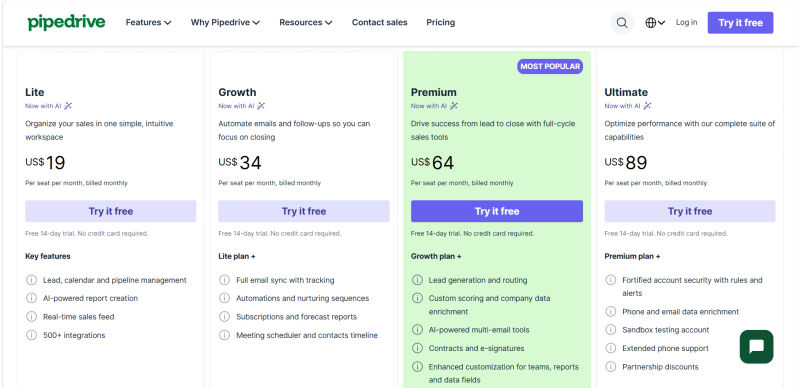
For most SMBs, mid-tier plans hit the sweet spot between automation depth, reporting needs, and budget, allowing you to upgrade only when usage or governance requirements genuinely increase.
Value for Money: SMB Perspective
When evaluating if a CRM is "worth the price," "best value," or "overpriced," Pipedrive hits a sweet spot for sales-focused SMBs. HubSpot offers a free tier, but its paid Sales Hub quickly becomes overpriced for small teams. Brevo might be the "best value" CRM for marketing-heavy teams, but Pipedrive is superior for dedicated sales pipelines. While Zoho CRM offers more features for less, it has a steeper learning curve.
If you compare the pricing models and total cost of ownership for Salesforce Sales Cloud, Pipedrive, and Freshsales for a small business sales team, Pipedrive's straightforward per-user pricing makes budgeting predictable. Freshsales offers a highly competitive TCO with built-in phone capabilities on lower tiers. Salesforce Sales Cloud has the highest TCO, often requiring expensive implementation and support fees, making it overpriced for simple use cases. With Pipedrive, base TCO is low, but add-ons like LeadBooster cost extra and increase your final budget.
Curious whether Pipedrive is actually the right fit for your sales motion? Discover how AuthenCIO matches CRMs to your unique workflow. 👉
Software covered in this article
To help you evaluate Pipedrive in the right context, this article compares it against a carefully curated set of competitors:









What is Pipedrive CRM? An Overview for Sales Teams & SMBs
Pipedrive is a cloud-based CRM built to help users visualize sales processes and focus on actions that close deals. Unlike all-in-one platforms like Zoho CRM, Pipedrive is unapologetically sales-centric.
To evaluate the business/productivity software company Pipedrive on CRMs for sales teams and small businesses, look at its core design: it eliminates pipeline blind spots. When you evaluate the CRM company Pipedrive on CRM for small businesses, its straightforward pricing and focused feature set make it highly cost-effective.
For early-stage ventures, evaluating the business/productivity software company Pipedrive on CRM for startups or CRM for founders highlights its rapid setup. Founders can map out sales processes in minutes without IT support. As operations expand, evaluating the business/productivity software company Pipedrive on CRMs for growing companies reveals that its tiered plans and automations scale seamlessly alongside revenue.
With over 91% of companies with 10 or more employees using CRM software, adoption is critical. When you evaluate the CRM company Pipedrive on CRM overall, its intuitive interface ensures reps are up and running in days, not weeks.
1. Pipedrive's Core Philosophy: Simplicity in Sales Pipeline Management
The entire Pipedrive interface and feature set are built around the concept of activity-based selling. This methodology posits that while you can't control outcomes (like closing a deal), you can control the actions and activities that lead to those outcomes. Pipedrive encourages reps to focus on scheduling calls, sending emails, and booking meetings—the tangible steps that move a deal forward.
This philosophy is most evident in its renowned visual sales pipeline. Functioning as a digital CRM pipe, it provides a clear, drag-and-drop interface that mirrors a real-world sales process, from initial contact to a closed deal. This CRM pipeline visualization is the platform's cornerstone, offering sales managers and reps an at-a-glance understanding of where every deal stands, what needs to be done next, and where potential bottlenecks are forming. This focus on clarity and action is what distinguishes Pipedrive in a crowded market and makes it a leading choice for sales-focused SMBs.
Key Pipedrive Features: Driving Sales Efficiency
Pipedrive's feature set is meticulously crafted to support its activity-based selling philosophy. It avoids the feature bloat common in other CRMs, instead concentrating on tools that directly impact sales process optimization and productivity.
1. Intuitive Sales Pipeline Management & Visualization
To evaluate the CRM company Pipedrive on sales pipeline management, you must look at its core Kanban-style interface, which remains its strongest asset across all pricing tiers. The platform allows you to create multiple, fully customizable sales pipelines with unique stages tailored to your specific sales cycle. For an SMB selling SaaS, a pipeline might include stages like 'Lead In,' 'Contact Made,' 'Demo Scheduled,' 'Proposal Sent,' and 'Negotiation.'
Each deal is represented as a card that can be dragged and dropped from one stage to the next. This simple view provides immediate clarity on pipeline health without requiring complex, costly implementations. A key feature here is 'Deal Rotting,' which highlights deals that have been sitting idle in a stage for too long, prompting reps to take action. This visual cue is invaluable for maintaining sales velocity and preventing opportunities from slipping through the cracks. The interface is clean and uncluttered, a stark contrast to the often data-dense screens of platforms like Salesforce, making it highly accessible for teams transitioning from spreadsheets.
2. Powerful Sales Automation Capabilities
Automation is critical for scaling sales operations. Companies adopting automation can see a 20-30% increase in sales productivity. Pipedrive's workflow automation uses simple 'if-then' rules to trigger actions based on specific events.
When evaluating the business/productivity software company Pipedrive on autonomous CRM and AI-powered CRM capabilities, the platform shows strong momentum. Pipedrive AI actively reduces manual input by offering smart deal probability predictions, AI-driven sales assistant recommendations, and automated data extraction to streamline pipeline management.
Practical Automation Examples for SMBs:
Automated Task Creation: When a deal is moved to the 'Demo Scheduled' stage, Pipedrive automatically creates a task to 'Prepare Demo Materials' two days before the meeting.
Email Automation in CRM: Evaluating the CRM company Pipedrive on email automation reveals a highly capable system. New leads can trigger pre-written welcome emails and multi-day nurture sequences. Furthermore, evaluating Pipedrive on AI CRM features highlights its ability to auto-draft personalized emails and summarize long threads, saving reps hours per week.
Lead Assignment: New leads from web forms are automatically assigned to reps in a round-robin fashion for equitable distribution and prompt follow-up.
These automations are built with a visual editor, empowering sales managers to optimize workflows without technical expertise. This is a significant advantage over more complex automation engines found in enterprise systems.
3. Lead Management & Deal Tracking
If you evaluate the CRM company Pipedrive on deal tracking tools, its core strength lies in visual, centralized pipeline management. Pipedrive excels at consolidating lead and deal information into an easily digestible interface. The 'LeadBooster' add-on (an optional paid feature) provides tools like a chatbot and live chat to capture leads directly from your website. Once captured, leads are quickly qualified and converted into deals with a single click, automatically populating the first stage of your pipeline.
Each deal view contains a complete history of all interactions, including emails, calls, notes, and scheduled activities. This 360-degree deal tracking ensures that any team member can pick up an account with full context, which is crucial for collaborative sales teams. You can also add custom fields to track data specific to your business, such as 'Product Interest' or 'Budget Size,' making Pipedrive adaptable to various sales environments, from real estate to tech startups.
4. Customizable Reporting & Analytics
While not as exhaustively comprehensive as analytics suites from platforms like HubSpot, Pipedrive's reporting is highly effective for sales-focused metrics. The main dashboard provides a clear overview of your pipeline value, deal conversion rates, and completed activities. You can build custom reports to track key performance indicators (KPIs) like:
Sales Performance: Track deals won/lost by rep, team, or time period.
Activity Reports: Monitor the volume of calls made, emails sent, and meetings booked to ensure reps are hitting their activity goals. This data is invaluable for sales coaching, allowing managers to identify which activities lead to the best outcomes and guide reps accordingly.
Sales Cycle Length: Analyze how long it takes for deals to move through the pipeline to identify inefficiencies.
These insights are crucial for accurate sales forecasting and performance management. For an SMB sales manager, this data is actionable and directly tied to revenue, avoiding the 'analysis paralysis' that can come with overly complex reporting tools. However, as an SMB grows, it might eventually miss highly advanced features like multi-source data aggregation or complex predictive analytics found in enterprise-grade platforms like SAP.
5. Mobile Access & Integrations (e.g., with Freshdesk, Monday)
In an era where sales happen everywhere, robust mobile access is non-negotiable. The mobile CRM software market is projected to grow to $31.61 billion in 2025, and Pipedrive's mobile app is a strong contender. It allows reps to manage deals, log calls, schedule activities, and access contact information on the go. This ensures that the CRM is always up-to-date, providing real-time pipeline visibility for managers.
Pipedrive also boasts a rich marketplace with over 300 integrations. This allows you to connect it with other essential business tools, creating a unified tech stack. For example:
Project Management: Integrate with Monday.com or Asana to hand off closed deals to the project delivery team seamlessly.
Customer Support: Connect with Freshdesk or Zendesk to give your sales team visibility into support tickets for their accounts.
Communication: Sync with Slack for real-time deal notifications or with email clients like Gmail and Outlook for two-way email synchronization.
This extensibility allows Pipedrive to function as the central hub for sales activity while playing nicely with the other software that runs your business.
Find Perfect Software for Your Business
Pipedrive Pros & Cons: An Unbiased Look
No CRM is perfect for every business. A balanced Pipedrive CRM review requires an objective look at its strengths and weaknesses, especially within the context of an SMB's needs.
The Advantages: Why Sales Teams Love Pipedrive
Exceptional Ease of Use: This is Pipedrive's most significant advantage. The intuitive interface, especially the visual pipeline, leads to high user adoption rates. Sales reps genuinely enjoy using it because it helps them sell rather than bogging them down with administrative tasks.
Sales-Focused Design: The platform is purpose-built for sales teams. Every feature is designed to facilitate activity-based selling and move deals forward. This specialization means there are fewer distractions compared to all-in-one platforms.
Powerful and Accessible Automation: Pipedrive's workflow builder makes it easy for non-technical users to automate repetitive tasks, freeing up significant time for selling activities.
Strong Customization: You can easily customize pipelines, deal fields, and activities to match your unique sales process, making the CRM feel like a natural extension of your workflow.
Excellent Mobile App: The fully-featured mobile app ensures productivity isn't confined to the office, allowing reps to manage their pipeline from anywhere.
Potential Drawbacks: What to Consider Before Committing
Limited All-in-One Functionality: If you're looking for a single platform to manage marketing campaigns, customer service tickets, and sales, Pipedrive is not it. You will need to integrate it with other tools (like Mailchimp for marketing or Freshdesk for service), which can add complexity and cost.
Basic Reporting in Lower Tiers: The most insightful reporting and forecasting features are reserved for the higher-priced Professional and Enterprise plans. Teams on the Essential or Advanced plans may find the analytics capabilities somewhat limited.
Per-User Pricing Can Add Up: While accessible for small teams, the per-user, per-month cost can become substantial as your team grows, potentially exceeding the cost of some competitors' bundled plans.
Lacks Deep Enterprise Features: For large organizations with highly complex sales hierarchies, territory management rules, or advanced security compliance needs, Pipedrive may fall short compared to enterprise-grade solutions like Salesforce.
Pipedrive Alternatives: Comparing Top CRM Solutions
Reddit consensus on a classement hubspot pipedrive salesforce monday:
En tant qu'expert-comptable (que pensent mes confrères sur reddit de hubspot vs pipedrive vs salesforce ?): 1. HubSpot, 2. Pipedrive, 3. Salesforce.
Comparaison hubspot pipedrive salesforce monday pour hôtels: 1. Monday, 2. HubSpot, 3. Pipedrive, 4. Salesforce.
1. Pipedrive vs. HubSpot CRM: Marketing & Sales Powerhouse
HubSpot is an all-in-one platform with a strong emphasis on inbound marketing. Its free CRM is incredibly generous, making it a popular starting point for many businesses. The key difference is philosophy: HubSpot aims to manage the entire customer lifecycle, from marketing to sales to service.
Best for: SMBs seeking an all-in-one marketing, sales, and service platform with a strong free offering to start.
2. Pipedrive vs. Zoho CRM: Comprehensive & Affordable
Zoho CRM is part of the vast Zoho ecosystem of business apps. Its main appeal is its incredible breadth of features at a highly competitive price point. Zoho can do almost anything—sales, marketing, support, inventory, and more. However, this comprehensiveness can also be its downfall, often leading to a complex setup.
Best for: Businesses on a tight budget that need an all-encompassing solution and are willing to invest time in configuration.
3. Pipedrive vs. Salesforce: Enterprise-Grade Solutions
Salesforce is the undisputed market leader in CRM, offering unparalleled power, customization, and scalability. It is the go-to choice for enterprise clients with complex requirements. For most SMBs, however, Salesforce is often too complex and expensive.
Best for: Large enterprises with complex requirements, dedicated admin resources, and a significant budget.
4. Pipedrive vs. Close CRM: Sales-Focused Simplicity
Close is perhaps Pipedrive's most direct competitor in terms of philosophy. It is also a sales-first CRM, but with a heavy emphasis on communication. Close integrates calling, SMS, and email deeply into its workflow, making it ideal for high-volume inside sales teams.
Best for: High-volume inside sales teams whose process is driven primarily by calls, texts, and emails.
Other Notable Alternatives (e.g., Capsule, Attio)
Capsule CRM: A simple, no-frills CRM excellent for tracking basic sales opportunities. - Best for: Small businesses upgrading from spreadsheets.
Attio: If you evaluate the business/productivity software company Pipedrive on CRM for VCs, its rigid deal stages fall short. Attio's flexible workspace model is superior. - Best for: VCs needing complex relationship mapping over traditional pipelines.
Base CRM (Zendesk Sell): In a Base CRM vs Pipedrive comparison, Base offers stronger native calling/SMS and Zendesk integration. Pipedrive wins on visual simplicity and lower starting pricing.
Is Pipedrive CRM Right for Your Sales Team or SMB?
The final decision comes down to your specific needs, team structure, and sales process. Pipedrive is not a one-size-fits-all solution, but it excels for a particular type of business.
Reading about alternatives is one thing; seeing which one fits your pipeline, team size and budget is another. Let AuthenCIO’s AI show you the shortlist. 🚀
1. Ideal Use Cases & Business Sizes
Pipedrive is often considered the best CRM for small business sales teams that fit the following profile:
Small to medium-sized businesses with a dedicated sales team (from 2 to 100 reps).
Companies with a defined, stage-based sales process that would benefit from visual management.
Sales teams that prioritize action and efficiency over complex administrative tasks.
Businesses that already have other tools for marketing and support and need a best-in-class CRM to plug into their existing tech stack.
It may not be the best fit for businesses looking for an all-in-one marketing, sales, and service suite, or for solopreneurs who need a free, basic contact manager.
2. Beyond the Features: Support, Security, and Setup
Customer Support: For SMBs without dedicated IT, support is crucial. Pipedrive offers 24/7 support via live chat and email for all paying customers. Phone support becomes available on the Power and Enterprise plans. They also maintain a comprehensive knowledge base, a community forum, and an academy with free courses to help teams get the most out of the platform.
Data Security & Compliance: Pipedrive takes security seriously, with multiple data centers and robust internal controls. It is fully GDPR-compliant and offers security features like two-factor authentication (2FA), advanced user permissions, and security alerts to help businesses protect their data.
Implementation & Data Migration: A key concern for any SMB is the transition. Pipedrive is designed for a quick setup. For businesses moving from spreadsheets or other CRMs, Pipedrive provides a straightforward data import tool. This focus on easy onboarding means a small team can be fully operational in a matter of days, not weeks, which is a significant advantage.
3. Maximizing ROI with Pipedrive
To get the most value from Pipedrive, focus on implementation and adoption. Take the time to accurately map your sales process to the pipeline stages. Invest in setting up a few key automations to handle repetitive tasks. Encourage your team to use the mobile app to keep data current. By leveraging Pipedrive's core strengths—its visual pipeline and activity-based methodology—you can significantly improve sales process efficiency, shorten sales cycles, and increase your win rate, leading to a tangible return on investment.
Try AuthenCIO
Move to faster, smarter software evaluation with AI
Conclusion: Streamlining Your Sales Process with Pipedrive
Pipedrive has carved out a powerful niche in the crowded CRM market by remaining true to its core mission: to make salespeople more effective. Its unwavering focus on intuitive, visual sales pipeline management makes it an exceptional tool for SMBs struggling with disorganized processes and a lack of visibility. While it may not offer the all-encompassing feature set of giants like HubSpot or Zoho, its specialization is its greatest asset.
For sales teams that need a tool that helps them sell, not a complex system that requires a manual to operate, Pipedrive is a top-tier contender. It provides the clarity, automation, and mobile access necessary to manage the sales process effectively without enterprise-level complexity.
Choosing a CRM is a critical decision. If this Pipedrive CRM review has shown you that a specialized, easy-to-use sales tool is what you need, it's a fantastic option. However, the best way to know for sure is to compare it directly against your unique business requirements.