
Introduction
HubSpot CRM remains a top-tier choice in 2026 for businesses seeking an all-in-one, highly intuitive platform. Known for its modular "Hub" architecture, it excels at aligning marketing, sales, and customer service teams under one unified database. However, while entry-level tiers are accessible, the total cost of ownership can scale aggressively as your contact list and feature requirements grow. Choosing a CRM is a high-stakes decision—the global market is projected to surpass $262 billion by 2032, and the wrong choice often leads to bloated costs and poor user adoption.
Streamline your software evaluation process
This in-depth review dissects the HubSpot CRM platform for 2026. We move beyond the marketing claims to analyze its hub-based architecture, complex pricing tiers, real-world pros and cons, and how it stacks up against top alternatives like Salesforce, Zoho, and Monday.com. We'll provide a clear framework to help you determine if HubSpot is the scalable engine your business needs or a costly trap to avoid.
Key Takeaways
Hub-based architecture: In 2026, HubSpot remains a top-tier, all-in-one revenue platform. Its modular design (Marketing, Sales, Service, CMS, and Operations Hubs) allows businesses to scale their tech stack seamlessly as they grow.
Scalability vs. Cost: While the free tier and Starter bundles are highly accessible for SMBs, the total cost of ownership (TCO) increases sharply at the Professional and Enterprise tiers due to user-seat minimums and contact limits.
Best for scaling teams: HubSpot is ideal for mid-market companies and growing SMBs that prioritize an intuitive, unified user interface over the highly complex, custom-coded environments typical of legacy CRMs like Salesforce.
Strong alternatives exist: If budget is a strict constraint or you require deep, specialized project management capabilities out of the box, competitors like Zoho CRM or Monday.com may offer better entry-level value.
HubSpot CRM Pros & Cons
No CRM is perfect. HubSpot's strengths are profound for its target audience, but its weaknesses become glaring for businesses with different needs.
Advantages of HubSpot CRM
Unmatched User Experience (UX): HubSpot is renowned for its clean, intuitive interface. This drives high user adoption, a critical factor for CRM success. Teams can get up and running with minimal training compared to older, clunkier CRMs.
Comprehensive All-in-One Platform: A core takeaway from our HubSpot all-in-one platform features overview 2026 is the power of its unified codebase. Natively integrating sales, marketing, and service data eliminates silos and enables seamless cross-functional workflows without relying on fragile third-party connectors.
Enhanced Team Alignment: In our HubSpot CRM collaboration features review 2025 2026, the platform excels at bridging departmental gaps. Shared inboxes, real-time document tracking, @mentions on deal records, and centralized communication logs ensure teams collaborate effectively on a single source of truth.
Powerful Inbound Marketing Engine: The Marketing Hub remains best-in-class for content marketing, SEO, and lead nurturing. Its automation capabilities are far more accessible than complex enterprise systems like Salesforce Marketing Cloud.
Strong Ecosystem and Marketplace: HubSpot's App Marketplace features over 1,500 integrations. While not as extensive as the Salesforce AppExchange, it easily covers the vast majority of SMB and mid-market business requirements.
Disadvantages of HubSpot CRM
Cost at Scale: As detailed above, the pricing model can become a significant financial burden. A competitor like Zoho CRM often offers a more comprehensive feature set at a fraction of the cost, making it a compelling alternative for budget-conscious businesses.
Limited Deep Customization: While HubSpot allows for some customization, it lacks the deep, programmatic capabilities of platforms like Salesforce. Enterprises with highly specific sales processes, multi-object relationships, or data models may find HubSpot too rigid.
Reporting and Analytics Gaps: HubSpot's out-of-the-box reporting is excellent for standard KPIs. However, creating complex multi-touch attribution reports, predictive analytics for niche use cases, or granular BI dashboards often requires expensive add-ons or exporting data to a third-party tool.
Sales Functionality Can Be Lighter: For complex B2B sales organizations, Sales Hub may lack the depth of a dedicated sales-first CRM like Pipedrive or the enterprise-grade features of Salesforce Sales Cloud, such as advanced territory management or complex quote-to-cash processes.
Automation Limitations: Based on HubSpot CRM automation reviews assessing pros and cons in 2025 and 2026, the workflow builder is a double-edged sword. While highly intuitive (a major pro), the cons include advanced automation being strictly gated behind expensive Professional or Enterprise tiers. Furthermore, executing complex branching logic or triggering workflows across certain custom objects remains less flexible than in competing enterprise platforms.
Best for: SMBs and scaling teams seeking integrated customer management.
Verdict: A robust, all‑in‑one CRM that delivers high ROI through automation and seamless data visibility.

Software covered in this article
To help you evaluate Hubspot CRM in the right context, this article compares it against a carefully curated set of competitors:







Who should consider HubSpot CRM in 2026?
HubSpot CRM is an excellent choice for small to mid-market (SMB) businesses and scaling mid-market companies that prioritize ease of use, a unified user experience, and an inbound-first go-to-market strategy. Its strength lies in consolidating marketing, sales, and service functions into a single, cohesive platform, reducing the friction often found in multi-vendor tech stacks. Companies that need to get up and running quickly with powerful marketing automation, a clean sales pipeline, and integrated customer service tools will find immense value. However, the primary caution is its total cost of ownership** (TCO) at scale**. The modular, hub-based pricing, combined with user- and contact-based fees, can become prohibitively expensive for larger teams, pushing enterprises towards more customizable platforms like Salesforce that can better accommodate highly specific workflows and legacy system integrations.
What is HubSpot’s hub-based architecture?
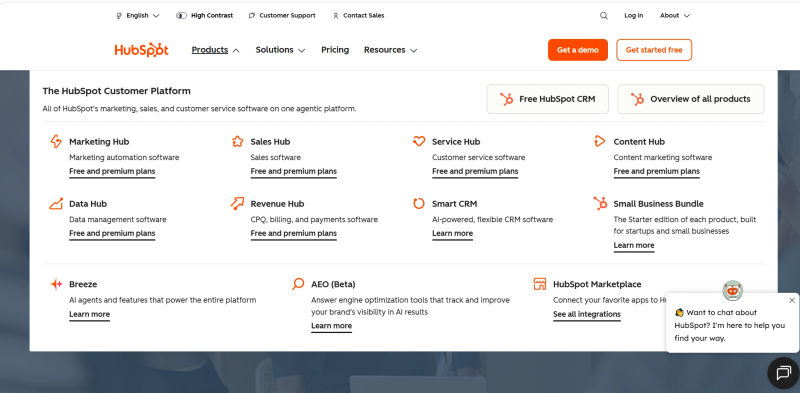
Any HubSpot all-in-one platform features review in 2025 or 2026 must highlight its hub-based architecture. HubSpot's power doesn't come from a single, monolithic product but from its integrated CRM Platform, which acts as the central nervous system, and a suite of specialized, modular 'Hubs' that plug into it. This architecture allows businesses to start with what they need and add functionality as they grow.
The core of this all-in-one ecosystem is the Smart CRM, which serves as the foundational, unified customer data model. For many, the journey begins with the Free CRM, a robust set of tools that provides the entry point into the ecosystem. Every interaction, from a website visit to a support ticket, is logged against a single contact record, creating a 360-degree view of the customer journey. The paid Hubs then build upon this foundation to share real-time data across marketing, sales, and service teams without requiring complex third-party integrations.
💡 Curious how HubSpot stacks up against other CRMs for your exact setup? Discover tailored matches based on your team size, stack, and goals.
1. HubSpot Marketing Hub: Powering Your Marketing Efforts
This is HubSpot's flagship product, designed for inbound marketing execution. It provides tools to attract, engage, and delight customers through automated, personalized campaigns. Key features include lead generation forms, email marketing, marketing automation workflows, social media management, and robust analytics.
In our 2025 and 2026 review, our evaluation of HubSpot advertising software features highlights its seamless cross-network ad tracking. Marketers can manage Google, Facebook, and LinkedIn campaigns natively, syncing ad spend directly with CRM deal stages for accurate ROI reporting. For example, a mid-market SaaS company can use the workflow engine to create a lead nurturing sequence that automatically sends targeted emails based on ad clicks or page visits, improving conversion rates without manual intervention.
2. HubSpot Sales Hub: Streamlining Your Sales Process
Sales Hub provides productivity tools and data-driven insights to help sales teams close deals faster. A thorough HubSpot CRM automation features review 2025 2026 highlights its core capabilities: email tracking, meeting scheduling, automated outreach sequences, and deal pipeline management. A key differentiator is its focus on reducing administrative friction. In fact, most HubSpot CRM automation reviews 2025 2026 praise the platform's workflow builders, which automatically trigger tasks, rotate leads, and update deal stages. A sales rep at a growing agency like HighLevel can use Sales Hub to automate follow-up emails, freeing up time for high-value conversations, while sales leaders leverage its forecasting tools to accurately predict revenue.
3. HubSpot Service Hub: Enhancing Customer Experience
Designed to help companies deliver exceptional customer service, Service Hub centralizes all customer communication channels. It features a shared inbox, ticketing system, knowledge base builder, customer feedback surveys (NPS, CSAT), and live chat. For instance, an e-commerce business can use Service Hub to manage incoming support requests via email and chat from one place, create a self-service help center to deflect common questions, and route complex issues with SLA routing to the right agent, ensuring timely resolution and higher customer satisfaction.
4. HubSpot CMS Hub: Building & Optimizing Your Website
CMS Hub is a content management system built on the CRM platform. Based on 2026 HubSpot CMS reviews, core features include a drag-and-drop editor, SEO recommendations, smart content, and performance monitoring.
Pricing: Starter begins at $20/month, while Professional ($400/month) and Enterprise ($1,200/month) unlock advanced reporting and custom objects.
Pros & Cons:
Pros: Native CRM integration lets businesses display dynamic visitor content—like industry-specific case studies—without complex plugins. Built-in security and ease of use are highly rated.
Cons: Users frequently cite the steep price jump to Professional and less developer flexibility compared to open-source standalone platforms.
5. HubSpot Operations Hub: Automating & Syncing Data
Operations Hub is the glue that holds the entire system together, especially for companies with complex processes or multiple software tools. It focuses on data synchronization, quality, and programmable automation. Its features include data sync with dozens of apps, data quality automation to clean up records, and custom workflow actions. For example, a company using a separate ERP can leverage Operations Hub to create a bi-directional sync, ensuring that when a deal is marked 'Closed-Won' in Sales Hub, a corresponding invoice is automatically generated in their financial system, eliminating manual data entry and errors.
HubSpot Free CRM: Automation, Features, and Limitations (2026)
HubSpot's Free CRM remains a popular entry point for small businesses in 2026, but its capabilities are strictly capped to encourage upgrading. If you are exploring HubSpot CRM automation free plan features 2026, expect very basic functionality. Users can automate simple email follow-ups after form submissions and set up basic ticket routing, but complex, multi-step workflows are locked behind the Professional and Enterprise tiers.
The HubSpot CRM automation free limitations 2026 mean you cannot build custom automation branches, automate lead scoring, or trigger internal notifications based on custom deal stages. For data-driven teams asking, "does HubSpot free CRM have reporting and analytics 2026?", the answer is yes, but with strict constraints. The free plan includes standard dashboard templates covering basic sales activity, deal pipelines, and website traffic. However, custom report builders, advanced attribution models, and cross-object reporting are excluded.
Finally, developers often ask, "does HubSpot free CRM include API access 2026?" Yes, the free tier does provide standard API access, allowing you to build basic integrations with third-party tools. However, API call limits are significantly lower on the free plan (typically capped at 250,000 requests per day), which can bottleneck high-volume data syncing operations as your business scales.
HubSpot AI-Powered CRM Features Evaluation 2026
HubSpot's integration of generative and predictive AI (branded as HubSpot AI) has fundamentally transformed its platform, making it a standout in our 2026 review. Building on the foundational AI tools introduced in 2025, the 2026 updates shift the focus from basic text generation to autonomous workflow management and deep predictive customer insights.
Our evaluation of the core HubSpot AI-powered CRM features highlights several major upgrades:
ChatSpot 2.0: The conversational CRM assistant can now execute complex, multi-step commands. Users can build custom reports, update deal stages, or launch segmented email campaigns directly from a single natural language prompt.
Predictive Deal Forecasting: Leveraging historical pipeline data, the AI assigns real-time probability scores to open deals. This significantly reduces pipeline blind spots and offers much higher accuracy than the initial 2025 iteration.
Campaign Agent & Content Assistant: Embedded across the Marketing and CMS Hubs, these tools generate SEO-optimized copy, draft personalized sales emails, and autonomously A/B test landing page variations without requiring third-party integrations.
Automated Data Cleansing: Operations Hub users now benefit from AI-driven deduplication and formatting, which autonomously maintains database hygiene in the background.
Overall, our evaluation shows that HubSpot's AI features deliver on their promise of reducing manual data entry and accelerating campaign creation. However, prospective buyers should note that while basic generative AI tools are available on lower tiers, the most powerful predictive analytics and autonomous agents are strictly gated behind the Professional and Enterprise plans.
Pricing, tiers and why total cost of ownership gets complicated
HubSpot’s pricing model is accessible via free and 'Starter' tiers, but costs escalate rapidly as headcount, contact volume, or feature requirements grow. Understanding the Total Cost of Ownership (TCO) requires looking beyond list prices.
For 2026, here is how current pricing for HubSpot Marketing Hub compares to major competitors:
HubSpot Marketing Hub: $15/mo (Starter) to $3,600+/mo (Enterprise).
Salesforce Marketing Cloud: ~$400/mo to $1,250+/mo.
Dynamics 365 Marketing: ~$1,700/mo per tenant.
Zoho Marketing: ~$25/mo base (Marketing Plus).
Note: All prices shown reflect typical monthly billing. Vendors often offer lower pricing for annual commitments, but those discounts are excluded here for easier comparison. Actual costs may vary depending on your requirements, usage volumes, and negotiated terms.
Plan | USD (per seat/month) | Best For | Key Features |
|---|---|---|---|
Professional | ≈ $50 | Growing SMBs needing scalable automation and reporting | Centralized data & process management, custom reporting, duplicate management |
Enterprise | ≈ $75 | Mid‑market & enterprise teams with complex workflows and compliance needs | Advanced customization, custom objects, sandbox, field-level permissions, team organization |
.webp?tr=w-800%2Cq-80%2Cf-auto%2Cc-at_max)
A. Pricing for Each Hub: Starter, Professional, Enterprise
Each Hub (Marketing, Sales, Service, etc.) is priced separately. This modularity offers flexibility but also creates complexity. The jump from Starter to Professional is significant, often moving from under $100/month to over $1,000/month for a small team. Enterprise tiers can run into many thousands per month, per Hub.
To illustrate the jump, here are some illustrative monthly price ranges (always check the official pricing page for current figures):
Starter Tier: ~$15 - $50 per user/hub
Professional Tier: ~$800 - $1,500+ for a baseline number of users/contacts
Enterprise Tier: ~$3,600 - $5,000+ for a higher baseline of users/contacts
B. Understanding User-Based & Usage-Based Costs
HubSpot's pricing is a mix of different models:
User-Based Costs: Sales Hub and Service Hub primarily charge per user ('seat'). A growing sales team of 10 will pay significantly more than a team of 3.
Contact-Based Costs: Marketing Hub's price is tied to the number of marketing contacts in your database. A B2C company with 100,000 contacts will face a much higher bill than a B2B company with 5,000.
Usage-Based Costs: Add-ons like dedicated IP addresses or higher API limits come with extra fees.
C. Hidden Costs and Scalability Considerations
Forecasting your true TCO requires planning for these common 'hidden' costs:
Onboarding Fees: Professional and Enterprise tiers have mandatory, one-time onboarding fees that can range from $1,000 to over $10,000.
Contact Tier Upgrades: As your database grows, you'll be automatically bumped into higher, more expensive contact tiers for Marketing Hub.
Seat Minimums: Enterprise tiers often require a minimum number of paid seats (e.g., 5 or 10), even if you don't need them all.
Feature Gaps: Critical features like predictive lead scoring or advanced permissions are often locked behind the highest tiers, forcing an expensive upgrade for a single capability.
For example, a mid-market company might start with Sales Hub Pro for 5 users. As they grow to 15 users and need more advanced forecasting, they must upgrade to Enterprise, which has a higher per-seat cost and a minimum seat requirement, causing their monthly bill to triple or quadruple.
Find Perfect Software for Your Business
HubSpot CRM for Different Business Sizes
HubSpot's suitability varies significantly based on a company's size, complexity, and growth trajectory.
1. HubSpot CRM for SMBs: Is it the Right Fit?
For small businesses and startups, HubSpot is often an exceptional fit. The free CRM tools provide a powerful starting point, and the Starter Suite offers an affordable, all-in-one package that can replace a messy collection of spreadsheets and single-purpose apps. The primary benefit for SMBs is speed-to-value; the user-friendly interface ensures high adoption without needing a dedicated admin. This makes it one of the best CRM for small business 2026 contenders, especially for those prioritizing marketing automation. A small B2B service company, for example, could use the free tools and Starter Hubs to manage its pipeline and run email campaigns effectively, something that might be cost-prohibitive with other platforms.
2. HubSpot CRM for Mid-Market Businesses: Scalability & Integration
Mid-market companies are HubSpot's sweet spot but also where the TCO evaluation becomes most critical. These businesses benefit immensely from the integrated nature of the Professional and Enterprise tiers, which can unify growing sales, marketing, and service teams. The platform's robust integration marketplace is crucial here, connecting to tools like NetSuite or Slack. However, this is also the stage where costs can spiral. A scaling tech company might find Marketing Hub Professional perfect for its needs but quickly outgrow the seat limits or reporting capabilities of Sales Hub Professional, forcing a very expensive jump to the Enterprise tier. This makes it a leading mid-market CRM solution, but one that requires careful financial forecasting.
3. HubSpot CRM for Enterprises: Advanced Needs & Solutions
While HubSpot is actively building more enterprise-grade features, it often falls short for large, complex organizations. HubSpot CRM for enterprises can be a viable departmental solution (e.g., for a specific business unit's marketing team), but it struggles as a company-wide, single source of truth. Enterprises typically require advanced security, granular user permissions, deep customization to match legacy processes, and compliance features that HubSpot may not offer out-of-the-box. For a global corporation with thousands of users and complex data residency requirements, a more extensible platform like Salesforce or Microsoft Dynamics 365 is usually the more appropriate, albeit more complex, choice.
💡 Not every team fits HubSpot’s strengths. Compare HubSpot with top CRM alternatives based on your workflows, budget, and growth plans.
HubSpot CRM Alternatives & Competitors
HubSpot doesn't exist in a vacuum. The CRM landscape is crowded, and several alternatives may be a better fit depending on your specific needs.
Competitor | Best For | Key Differentiator | Price Point | TCO Complexity |
Salesforce | Enterprises & Complex B2B Sales | Unmatched customization, scalability, and ecosystem | High | Very High |
Zoho CRM | SMBs & Mid-Market (Budget-Conscious) | All-in-one suite with exceptional value-for-money | Low-Mid | Moderate |
Monday.com | Project-based & Visual Teams | Highly flexible, visual interface combining CRM & PM | Mid | Low-Moderate |
Pipedrive | Sales-First SMBs | Simplicity and focus on pipeline management | Mid | Low |
Freshworks | SMBs & Mid-Market (Sales & Support) | Unified sales and support with a user-friendly UI | Mid | Moderate |
Attio | Modern Startups & VC | Relationship-based, flexible data model | Mid | Low |
Keap | Solopreneurs & Small Service Businesses | Combined CRM and marketing automation for small biz | Mid-High | Moderate |
HighLevel | Marketing Agencies | White-label CRM and marketing platform for agencies | Mid | Low |
1. HubSpot vs. Salesforce
This is the classic comparison. Choose Salesforce when you are a large enterprise with complex, non-negotiable business processes that require deep custom development and a vast ecosystem of specialized apps. A global manufacturing firm needing to integrate its CRM with a legacy ERP system would lean towards Salesforce. Choose HubSpot when you are a mid-market company that values speed-to-value and user experience over infinite customization.
2. HubSpot vs. Zoho CRM
Choose Zoho CRM when your primary driver is budget. Zoho offers a sprawling suite of business apps (Zoho One) that can run an entire company at an incredibly competitive price. A bootstrapped SMB needing CRM, finance, and HR tools would find Zoho's value unbeatable. Choose HubSpot when you are willing to pay a premium for a more polished UI and a more seamless, albeit less comprehensive, all-in-one experience.
3. HubSpot vs. Monday.com
Choose Monday.com when your business operates in a highly visual, project-centric manner. Its strength lies in its flexible, spreadsheet-like interface that can be adapted for countless operational workflows beyond traditional sales pipelines. A creative agency managing client projects alongside sales opportunities would thrive in Monday.com. Choose HubSpot when you need a more structured, dedicated system for marketing automation and sales sequences.
Other Notable Alternatives
Freshworks: A strong contender for SMBs and mid-market companies looking for a user-friendly alternative to HubSpot that tightly integrates sales (Freshsales) and support (Freshdesk).
Attio: A newer, modern CRM built for startups and venture capital firms. Its flexible, relationship-centric data model is perfect for businesses whose networks are their most valuable asset.
Keap** **(formerly Infusionsoft): A long-standing player focused on small service-based businesses, combining CRM with powerful marketing and e-commerce automation.
Microsoft Dynamics 365: A key consideration for larger organizations already embedded in the Microsoft ecosystem, offering deep integration with Office 365, Power BI, and Azure.
Implementation, Integrations, and Migration considerations
Adopting any CRM is a significant undertaking. A successful HubSpot implementation requires careful planning around data, integrations, and user adoption.
Data Migration and Mapping: Before importing a single contact, map out your existing data fields to HubSpot's properties. A common mistake is a 'lift and shift' import, which leads to messy data. Plan for data cleansing before migration. For example, ensure lead statuses from your old system map correctly to HubSpot's lifecycle stages.
Integration Strategy: While HubSpot has many native integrations, complex stacks require a clear strategy. Decide between native integrations, middleware (e.g., Zapier), or custom API development. A common surprise is underestimating the cost and complexity of maintaining these connections. For larger projects, engaging certified HubSpot implementation partners can be invaluable, as they bring expertise in navigating complex data models and integrations.
User Training and Governance: High user adoption is key to CRM ROI. Develop a training plan tailored to different roles. While the basic interface is intuitive, mastering advanced features in the workflow engine or reporting dashboards has a steeper learning curve. Establish clear governance rules from day one to prevent the portal from becoming chaotic.
Choosing the right CRM — decision framework and quick checklist
Making an informed decision requires a structured approach. Use this framework to evaluate HubSpot and its alternatives against your specific business needs.
1. Define Your Business Goals: What problem are you trying to solve? (e.g., 'Increase lead conversion rate by 20%,' 'Reduce average ticket resolution time by 3 hours.')
2. Map Your Core Processes: Document your current sales, marketing, and service workflows. Which steps are manual and could be automated? This will reveal your true feature requirements.
3. Assess Your Data and Integration Needs: List all the systems your CRM must connect with. How many contacts, companies, and deals do you have? Project this growth over the next 2-3 years to forecast costs accurately.
4. Set a Realistic Budget (TCO): Your budget must include more than just the monthly subscription. Factor in license fees, one-time implementation/onboarding fees, data migration costs, integration costs, and ongoing training.
Quick Checklist for Evaluating HubSpot:
Does our go-to-market strategy align with HubSpot's inbound-first philosophy?
Is user-friendliness a top priority to ensure team adoption?
Have we mapped our required features to specific Hubs and Tiers (Starter, Pro, Enterprise)?
Have we projected our user and contact growth for the next 24 months?
Have we calculated the full TCO, including onboarding and potential add-ons?
Are we comfortable with HubSpot's level of customization, or do we need deeper flexibility?
Try AuthenCIO
Move to faster, smarter software evaluation with AI
Bottom line and recommended next steps
To give an honest review of HubSpot for CRM in 2026: it is one of the most user-friendly, highly integrated platforms on the market, but it is not cheap. Its modular "Hub" architecture provides a seamless, scalable path from startup to mid-market leader. However, its primary drawback—a complex, usage- and user-based pricing model—demands rigorous due diligence. The biggest mistake prospective buyers make is underestimating the total cost of ownership (TCO) as their contact database and team size grow.
Ultimately, HubSpot is the right choice if you are an SMB or mid-market company committed to an inbound marketing strategy, value speed-to-value over deep customization, and have a clear, realistic budget for scaling. Conversely, it is likely the wrong choice if you are highly budget-sensitive, require highly complex enterprise-grade data architecture, or operate a rigid, outbound-heavy sales motion.
Your next steps should be pragmatic and data-driven:
Start a Trial: Sign up for HubSpot's free tools and a trial of the paid Hubs you are considering to test the interface.
Build a TCO Forecast: Use your projected user count and marketing contact growth to build a strict 12- to 36-month cost model.
Compare Your Shortlist: Don't evaluate HubSpot in isolation. Test it against competitors like Salesforce or Zoho to ensure you are getting the right feature-to-price ratio.